
FCSS_NST_SE-7.6 · Question #31
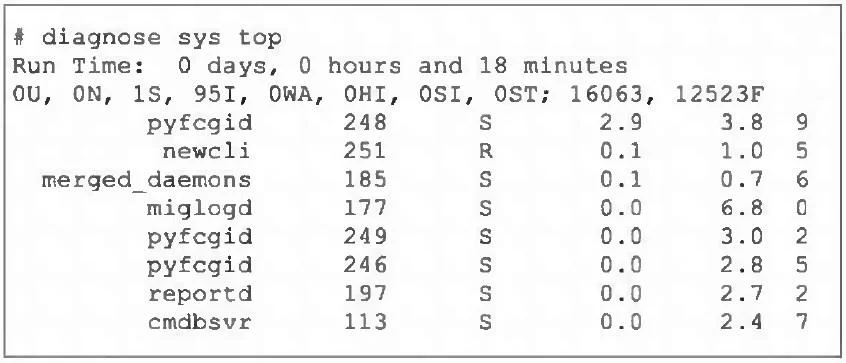
Refer to the exhibit. Which three pieces of information does the diagnose sys top command provide? (Choose three.)
The correct answer is A. The miglogd daemon is running on CPU core ID 0. B. The diagnose sys top command has been running for 18 minutes. D. The cmdbsvr process is occupying 2.4% of the total user memory space. The last column shows the CPU core ID, so you can see miglogd is running on core 0. The "Run Time" line tells you how long the system (and thus the top command) has been up - 18 minutes in this case. The MEM% column shows cmdbsvr is using 2.4 % of memory.
Question
Refer to the exhibit. Which three pieces of information does the diagnose sys top command provide? (Choose three.)
Exhibit
Options
- AThe miglogd daemon is running on CPU core ID 0.
- BThe diagnose sys top command has been running for 18 minutes.
- CThe miglogd daemon would be on top of the list, if the administrator pressed m on the keyboard.
- DThe cmdbsvr process is occupying 2.4% of the total user memory space.
- EIf the neweli daemon continues to be in the R state, it will need to be manually restarted.
How the community answered
(42 responses)- A83% (35)
- C12% (5)
- E5% (2)
Explanation
The last column shows the CPU core ID, so you can see miglogd is running on core 0. The "Run Time" line tells you how long the system (and thus the top command) has been up - 18 minutes in this case. The MEM% column shows cmdbsvr is using 2.4 % of memory.
Topics
Community Discussion
No community discussion yet for this question.