
FCSS_NST_SE-7.4 · Question #8
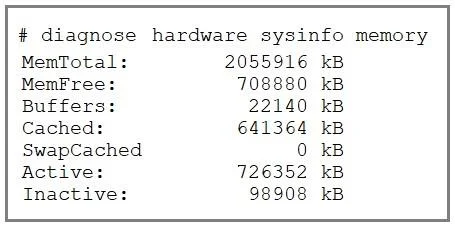
Refer to the exhibit, which shows the partial output of diagnose hardware sysinfo memory. An administrator is troubleshooting a high memory issue. Which two memory allocations can help the…
The correct answer is C. The I/O cache, which has 641364 kB of memory allocated to it. D. The unused cache page, which is represented by the value indicated next to the Inactive. The I/O cache ("Cached"): At 641 364 kB this shows how much memory is tied up in filesystem page caching, and is immediately reclaimable under pressure. The unused cache pages ("Inactive"): The Inactive figure (98 908 kB) represents pages that were cached but haven't been used…
Question
Refer to the exhibit, which shows the partial output of diagnose hardware sysinfo memory. An administrator is troubleshooting a high memory issue. Which two memory allocations can help the administrator pinpoint the issue? (Choose two.)
Exhibit
Options
- AThe 98908 kB of memory that will never be used.
- BThe user space, which has 708880 kB of physical memory that is not used by the system.
- CThe I/O cache, which has 641364 kB of memory allocated to it.
- DThe unused cache page, which is represented by the value indicated next to the Inactive
How the community answered
(17 responses)- A18% (3)
- B6% (1)
- C76% (13)
Explanation
The I/O cache ("Cached"): At 641 364 kB this shows how much memory is tied up in filesystem page caching, and is immediately reclaimable under pressure. The unused cache pages ("Inactive"): The Inactive figure (98 908 kB) represents pages that were cached but haven't been used recently - another pool of memory the OS can free when needed.
Topics
Community Discussion
No community discussion yet for this question.