
FCSS_NST_SE-7.4 · Question #56
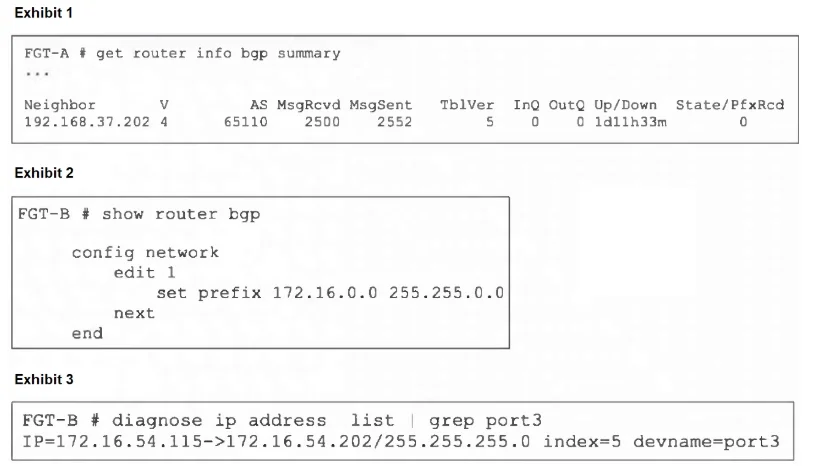
Refer to the exhibits. An administrator is attempting to advertise the network configured on port3. However, FGT-A is not receiving the prefix. Which two actions can the administrator take to fix…
The correct answer is A. Modify the prefix using the network command from 172.16.0.0/16 to 172.16.54.0/24. D. Use the set network-import-check disable command. BGP's network statement only advertises prefixes that exactly match routes in the RIB by default. Since port3 is 172.16.54.0/24, changing the prefix to 172.16.54.0/24 ensures it's in the routing table and will be advertised. You can disable the network‑import‑check global (or…
Question
Refer to the exhibits. An administrator is attempting to advertise the network configured on port3. However, FGT-A is not receiving the prefix. Which two actions can the administrator take to fix this problem? (Choose two.)
Exhibit
Options
- AModify the prefix using the network command from 172.16.0.0/16 to 172.16.54.0/24.
- BManually add the BGP route on FGT-A.
- CRestart BGP using a soft reset to force both peers to exchange their complete BGP routing
- DUse the set network-import-check disable command.
How the community answered
(44 responses)- A80% (35)
- B7% (3)
- C14% (6)
Explanation
BGP's network statement only advertises prefixes that exactly match routes in the RIB by default. Since port3 is 172.16.54.0/24, changing the prefix to 172.16.54.0/24 ensures it's in the routing table and will be advertised. You can disable the network‑import‑check global (or per‑prefix) setting so FortiGate will advertise the 172.16.0.0/16 prefix even though no matching route exists in the RIB.
Topics
Community Discussion
No community discussion yet for this question.