
FCSS_NST_SE-7.4 · Question #48
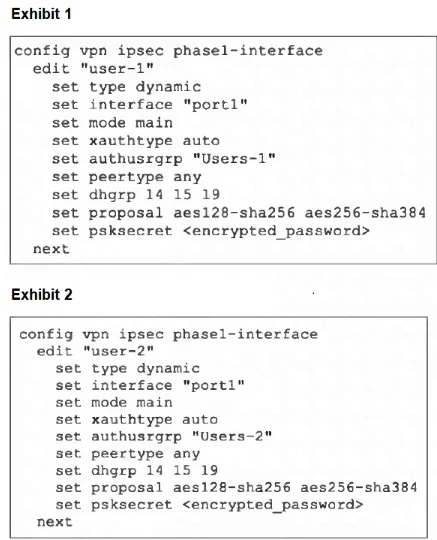
Refer to the exhibits, which contain the partial configurations of two VPNs on FortiGate. An administrator has configured two VPNs for two different user groups. Users who are in the Users- 2 group…
The correct answer is A. Change to aggressive mode on both VPNs. D. Set up specific peer IDs on both VPNs. Change both tunnels to aggressive mode so FortiGate can match dynamic peers by identity. Configure a unique peer ID on each phase1-interface so the correct VPN is selected for Users‑1
Question
Refer to the exhibits, which contain the partial configurations of two VPNs on FortiGate. An administrator has configured two VPNs for two different user groups. Users who are in the Users- 2 group are not able to connect to the VPN. After running a diagnostics command, the administrator discovers that FortiGate is not matching the user-2 VPN for members of the Users- 2 group. Which two changes must the administrator make to fix the issue? (Choose two.)
Exhibit
Options
- AChange to aggressive mode on both VPNs.
- BEnable XAuth on both VPNs.
- CUse different pre-shared keys on both VPNs.
- DSet up specific peer IDs on both VPNs.
How the community answered
(37 responses)- A78% (29)
- B8% (3)
- C14% (5)
Explanation
Change both tunnels to aggressive mode so FortiGate can match dynamic peers by identity. Configure a unique peer ID on each phase1-interface so the correct VPN is selected for Users‑1
Topics
Community Discussion
No community discussion yet for this question.