
FCSS_NST_SE-7.4 · Question #27
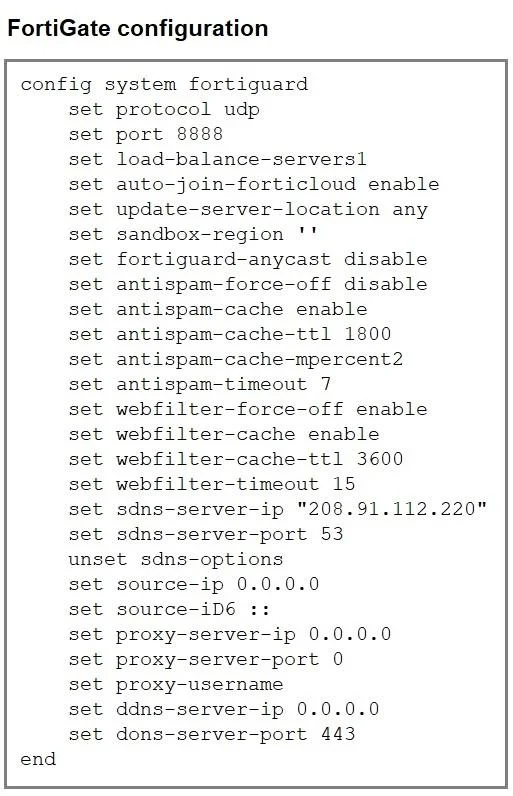
Refer to the exhibit, which shows a FortiGate configuration. An administrator is troubleshooting a web filter issue on FortiGate. The administrator has configured a web filter profile and applied it…
The correct answer is A. Disable webfilter-force-off. The global "kill‑switch" for web filtering is turned on (set webfilter-force-off enable), which bypasses all web filters. You need to turn it off (for example with config system fortiguard -> set webfilter-force-off disable) so that your web filter profile will actually inspect…
Question
Refer to the exhibit, which shows a FortiGate configuration. An administrator is troubleshooting a web filter issue on FortiGate. The administrator has configured a web filter profile and applied it to a policy; however, the web filter is not inspecting any traffic that is passing through the policy. What must the administrator do to fix the issue?
Exhibit
Options
- ADisable webfilter-force-off.
- BDisable webfilter-force-off at the VDOM level.
- CSet sdns-server-ip to service.fortiguard.net.
- DChange protocol to TCP and port to 53.
How the community answered
(48 responses)- A71% (34)
- B4% (2)
- C15% (7)
- D10% (5)
Explanation
The global "kill‑switch" for web filtering is turned on (set webfilter-force-off enable), which bypasses all web filters. You need to turn it off (for example with config system fortiguard -> set webfilter-force-off disable) so that your web filter profile will actually inspect traffic.
Topics
Community Discussion
No community discussion yet for this question.