
FCSS_LED_AR-7.6 · Question #51
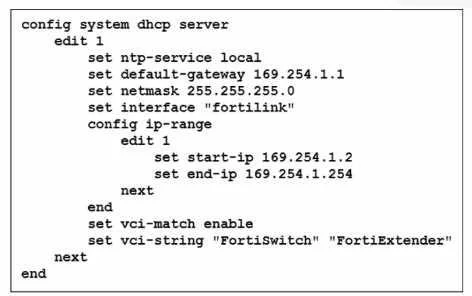
You've configured the FortiLink interface, and the DHCP server is enabled by default. The resulting DHCP server settings are shown in the exhibit. What is the role of the vci-string setting in this…
The correct answer is C. To connect, devices must match the VCI string; otherwise, they will not receive an IP address. The DHCP configuration shows: set vci-match enable set vci-string "FortiSwitch" "FortiExtender" VCI = Vendor Class Identifier (DHCP option 60) When vci-match is enabled, the DHCP server will only respond to DHCP requests from clients whose VCI string matches the configured…
Question
You've configured the FortiLink interface, and the DHCP server is enabled by default. The resulting DHCP server settings are shown in the exhibit. What is the role of the vci-string setting in this configuration?
Exhibit
Options
- ATo ignore DHCP requests coming from FortiSwitch and FortiExtender devices.
- BTo restrict the IP address assignment to devices that have FortiSwitch or FortiExtender as their
- CTo connect, devices must match the VCI string; otherwise, they will not receive an IP address.
- DTo reserve IP addresses for FortiSwitch and FortiExtender devices.
How the community answered
(33 responses)- B3% (1)
- C91% (30)
- D6% (2)
Explanation
The DHCP configuration shows: set vci-match enable set vci-string "FortiSwitch" "FortiExtender" VCI = Vendor Class Identifier (DHCP option 60) When vci-match is enabled, the DHCP server will only respond to DHCP requests from clients whose VCI string matches the configured vendor identifiers. FortiSwitch and FortiExtender both send DHCP option 60 with: This is used in FortiLink deployments so only these devices receive IP addresses on the FortiLink
Topics
Community Discussion
No community discussion yet for this question.