
FCSS_EFW_AD-7.6 · Question #42
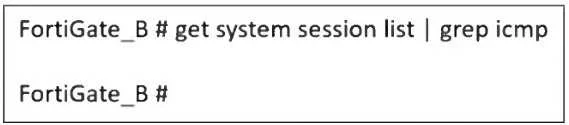
Refer to the exhibit, which shows a command output. FortiGate_A and FortiGate_B are members of an FGSP cluster in an enterprise network. While testing the cluster using the ping command, the…
The correct answer is B. session-pickup-connectionless is set to disable on FortiGate_B. The Fortinet FGSP (FortiGate Session Life Support Protocol) cluster allows session synchronization between two FortiGate devices to provide seamless failover. However, ICMP (ping) is a connectionless protocol, and by default, FortiGate does not synchronize connectionless…
Question
Refer to the exhibit, which shows a command output. FortiGate_A and FortiGate_B are members of an FGSP cluster in an enterprise network. While testing the cluster using the ping command, the administrator monitors packet loss and found that the session output on FortiGate_B is as shown in the exhibit. What could be the cause of this output on FortiGate_B?
Exhibit
Options
- AThe session synchronization is encrypted.
- Bsession-pickup-connectionless is set to disable on FortiGate_B.
- CFortiGate_B is configured in passive mode.
- DFortiGate_A and FortiGate_B have the same standalone-group-id value.
How the community answered
(26 responses)- A15% (4)
- B50% (13)
- C27% (7)
- D8% (2)
Explanation
The Fortinet FGSP (FortiGate Session Life Support Protocol) cluster allows session synchronization between two FortiGate devices to provide seamless failover. However, ICMP (ping) is a connectionless protocol, and by default, FortiGate does not synchronize connectionless sessions unless explicitly enabled. The command get system session list | grep icmp on FortiGate_B returns no output, meaning that ICMP sessions are not being synchronized from FortiGate_A. If session-pickup-connectionless is disabled, FortiGate_B will not receive ICMP sessions, causing packet loss during failover.
Topics
Community Discussion
No community discussion yet for this question.