
FCSS_EFW_AD-7.6 · Question #29
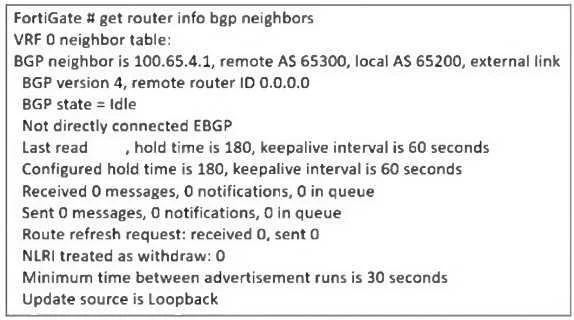
Refer to the exhibit, which contains a partial command output. The administrator has configured BGP on FortiGate. The status of this new BGP configuration is shown in the exhibit. What configuration…
The correct answer is D. Enable ebgp-enforce-multihop. From the BGP neighbor status output, the key issue is that BGP is stuck in the "Idle" state, meaning the FortiGate is unable to establish a BGP session with its peer 100.65.4.1 (Remote AS The output also shows: "Not directly connected EBGP" This means the BGP peer is not on the…
Question
Refer to the exhibit, which contains a partial command output. The administrator has configured BGP on FortiGate. The status of this new BGP configuration is shown in the exhibit. What configuration must the administrator consider next?
Exhibit
Options
- AConfigure a static route to 100.65.4.1.
- BConfigure the local AS to 65300.
- CContact the remote peer administrator to enable BGP
- DEnable ebgp-enforce-multihop.
How the community answered
(36 responses)- A14% (5)
- B3% (1)
- C6% (2)
- D78% (28)
Explanation
From the BGP neighbor status output, the key issue is that BGP is stuck in the "Idle" state, meaning the FortiGate is unable to establish a BGP session with its peer 100.65.4.1 (Remote AS The output also shows: "Not directly connected EBGP" This means the BGP peer is not on the same subnet, requiring "Update source is Loopback" Since a loopback interface is used, FortiGate must be configured to allow BGP neighbors over multiple hops. To resolve this issue, the administrator must enable ebgp-enforce-multihop, which allows BGP sessions to be established even when the neighbors are not directly connected.
Topics
Community Discussion
No community discussion yet for this question.