
FCSS_CDS_AR-7.6 · Question #46
Refer to the exhibit. A senior administrator in a multinational organization needs to include a comment in the template shown in the exhibit to ensure that administrators from other regions change…
The correct answer is C. The administrator can add the comment with the # character next to the InstanceType section. AWS CloudFormation templates written in YAML support inline comments using the # character. The administrator can simply add a comment next to the InstanceType section to instruct other administrators to adjust the instance size as needed.
Question
Refer to the exhibit. A senior administrator in a multinational organization needs to include a comment in the template shown in the exhibit to ensure that administrators from other regions change the Amazon Machine Image (AMI) ID to one that is valid in their location. How can the administrator add the required comment in that section of the file?
Exhibit
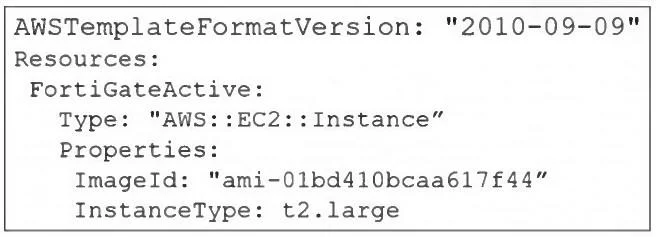
Options
- AThe administrator can include the comment with the aws cloudformation update-stack command.
- BThe administrator must convert the template file to YAML format to add a comment.
- CThe administrator can add the comment with the # character next to the InstanceType section.
- DThe administrator must update the AWSTemplateFormatVersion to the latest version.
How the community answered
(33 responses)- A3% (1)
- B3% (1)
- C88% (29)
- D6% (2)
Explanation
AWS CloudFormation templates written in YAML support inline comments using the # character. The administrator can simply add a comment next to the InstanceType section to instruct other administrators to adjust the instance size as needed.
Topics
Community Discussion
No community discussion yet for this question.