
FCSS_ADA_AR-6.7 · Question #32
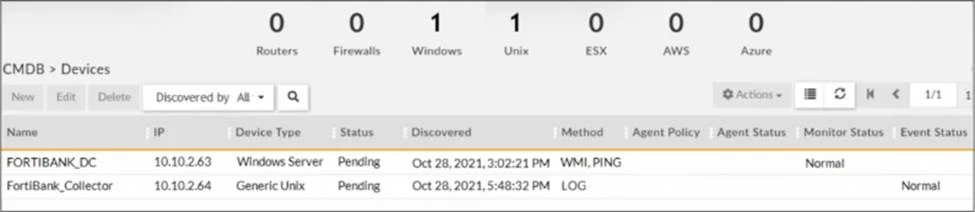
Refer to the exhibit. Why is the windows device still in the CMDB, even though the administrator uninstalled the windows agent?
The correct answer is D. The device must be deleted manually from the CMDB. In FortiSIEM, when an agent is uninstalled from a Windows device, the device remains in the CMDB (Configuration Management Database) until it is manually removed. Uninstalling the agent does not automatically remove the device from the CMDB. CMDB maintains discovered devices…
Question
Refer to the exhibit. Why is the windows device still in the CMDB, even though the administrator uninstalled the windows agent?
Exhibit
Options
- AThe device must be deleted from backend of FortiSIEM
- BThe device has performance jobs assigned
- CThe device was not installed properly
- DThe device must be deleted manually from the CMDB
How the community answered
(61 responses)- A5% (3)
- B2% (1)
- C2% (1)
- D92% (56)
Explanation
In FortiSIEM, when an agent is uninstalled from a Windows device, the device remains in the CMDB (Configuration Management Database) until it is manually removed. Uninstalling the agent does not automatically remove the device from the CMDB. CMDB maintains discovered devices even if they no longer report logs, ensuring historical tracking. Administrators must manually delete the device from the CMDB > Devices section.
Topics
Community Discussion
No community discussion yet for this question.