
FCSS_ADA_AR-6.7 · Question #10
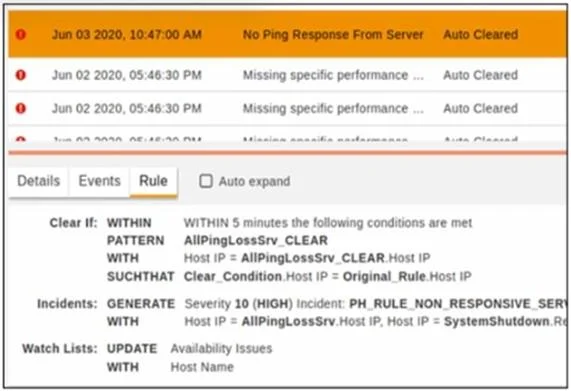
Refer to the exhibit. Why was this incident auto cleared?
The correct answer is A. Within five minutes, the packet loss percentage dropped to a level where the host IP of the original. From the "Clear If" condition in the exhibit: WITHIN 5 minutes, the system checks if the pattern AllPingLossSrv_CLEAR occurs. The Host IP of the clear condition must match the Host IP of the original rule (Clear_Condition.Host IP = Original_Rule.Host IP). If this condition is…
Question
Refer to the exhibit. Why was this incident auto cleared?
Exhibit
Options
- AWithin five minutes, the packet loss percentage dropped to a level where the host IP of the original
- BWithin five minutes the packet loss percentage dropped to a level where the reporting IP is the
- CThe original rule did not trigger within five minutes
- DWithin five minutes, the packet loss percentage dropped to a level where the reporting IP is same
How the community answered
(36 responses)- A64% (23)
- B11% (4)
- C19% (7)
- D6% (2)
Explanation
From the "Clear If" condition in the exhibit: WITHIN 5 minutes, the system checks if the pattern AllPingLossSrv_CLEAR occurs. The Host IP of the clear condition must match the Host IP of the original rule (Clear_Condition.Host IP = Original_Rule.Host IP). If this condition is met, the system automatically clears the incident because it indicates that network connectivity has been restored (packet loss has dropped). Thus, the incident was auto-cleared because the system detected that the issue was resolved within the defined 5-minute window, meeting the conditions for auto-clearance.
Topics
Community Discussion
No community discussion yet for this question.