
FCP_ZCS_AD-7.4 · Question #63
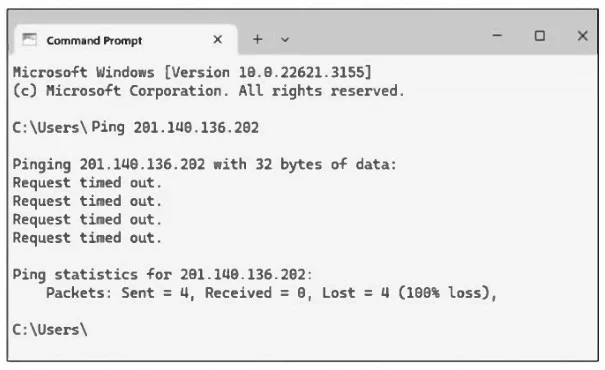
Refer to the exhibit. Ping executed from an on-premise workstation. A new Linux server VM was deployed in Azure. While performing basic network connectivity testing from your on-premises network…
The correct answer is B. Add an inbound security rule on the network security group (NSG). Azure's default NSG rules do not permit ICMP, so pings to your VM's public IP will time out. To enable ping, you create an NSG inbound rule that allows ICMP (Protocol 1) from the desired source addresses. This change permits the Azure fabric to forward ICMP echo requests to your
Question
Refer to the exhibit. Ping executed from an on-premise workstation. A new Linux server VM was deployed in Azure. While performing basic network connectivity testing from your on-premises network, you noticed that executing a ping to its public IP address returns “request time out” messages. Which configuration can you perform to allow ICMP traffic?
Exhibit
Options
- AAdd an entry on the Linux firewall
- BAdd an inbound security rule on the network security group (NSG)
- CRedeploy the VM
- DAdd user-defined routes (UDR) rule
Explanation
Azure's default NSG rules do not permit ICMP, so pings to your VM's public IP will time out. To enable ping, you create an NSG inbound rule that allows ICMP (Protocol 1) from the desired source addresses. This change permits the Azure fabric to forward ICMP echo requests to your
Topics
Community Discussion
No community discussion yet for this question.