
FCP_FWB_AD-7.4 · Question #1
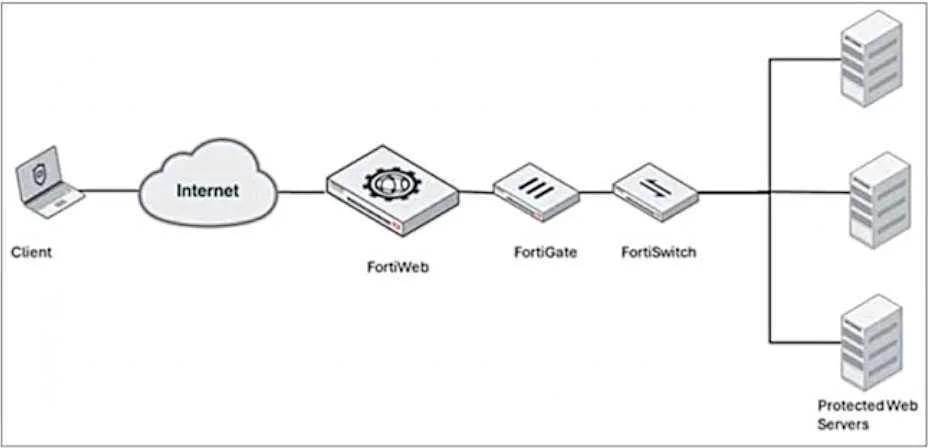
Refer to the exhibit. A FortiWeb device is deployed upstream of a device performing source network address translation (SNAT) or load balancing. What configuration must you perform on FortiWeb to…
The correct answer is A. Enable and configure the Preserve Client IP setting. When FortiWeb is deployed upstream of a device performing source network address translation (SNAT) or load balancing, the original client IP address may be lost. To preserve the original client IP address, you must enable and configure the Preserve Client IP setting on…
Question
Refer to the exhibit. A FortiWeb device is deployed upstream of a device performing source network address translation (SNAT) or load balancing. What configuration must you perform on FortiWeb to preserve the original IP address of the client?
Exhibit
Options
- AEnable and configure the Preserve Client IP setting.
- BUse a transparent operating mode on FortiWeb.
- CEnable and configure the Add X-Forwarded-For setting.
- DTurn off NAT on the FortiWeb.
How the community answered
(25 responses)- A72% (18)
- B16% (4)
- C8% (2)
- D4% (1)
Explanation
When FortiWeb is deployed upstream of a device performing source network address translation (SNAT) or load balancing, the original client IP address may be lost. To preserve the original client IP address, you must enable and configure the Preserve Client IP setting on FortiWeb. This allows FortiWeb to retain and pass the client's original IP address to the backend servers for accurate logging and processing.
Topics
Community Discussion
No community discussion yet for this question.