
Fortinet
FCP_FMG_AD-7.6 · Question #42
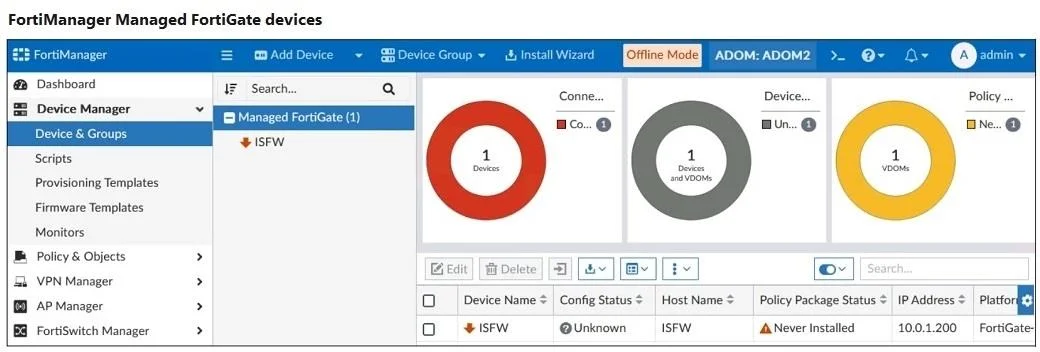
Refer to the exhibit. A junior administrator is troubleshooting a FortiManager connectivity issue that is occurring with a managed FortiGate device. Given the FortiManager device manager settings…
The correct answer is D. The administrator recently restored a FortiManager configuration file. FMG is in offline mode, which is activated after restoring a configuration file.
Troubleshooting
Question
Refer to the exhibit. A junior administrator is troubleshooting a FortiManager connectivity issue that is occurring with a managed FortiGate device. Given the FortiManager device manager settings shown in the exhibit, what can you conclude from this scenario?
Exhibit
Options
- AThe administrator must refresh the device to restore connectivity.
- BFortiManager lost internet connectivity, therefore, the device appears to be down.
- CThe administrator can reclaim the FortiGate to FortiManager protocol (FGFM) tunnel to get the
- DThe administrator recently restored a FortiManager configuration file.
How the community answered
(30 responses)- A3% (1)
- B3% (1)
- C10% (3)
- D83% (25)
Explanation
FMG is in offline mode, which is activated after restoring a configuration file.
Topics
#FGFM connectivity#device manager#configuration restore#device status
Community Discussion
No community discussion yet for this question.