
FCP_FMG_AD-7.6 · Question #11
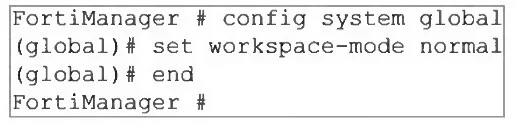
Refer to the exhibit. What are two results from the configuration shown in the exhibit? (Choose two.)
The correct answer is A. Ungraceful closed sessions will keep the ADOM in a locked state until the administrator session C. The same administrator can lock more than one ADOM at the same time. If an administrator locks an ADOM (checks it out) and then closes their session ungracefully (e.g., browser crash, network disconnect) without explicitly checking the configuration back in, the ADOM remains in a locked state. FortiManager relies on the configured session…
Question
Refer to the exhibit. What are two results from the configuration shown in the exhibit? (Choose two.)
Exhibit
Options
- AUngraceful closed sessions will keep the ADOM in a locked state until the administrator session
- BThe administrator can lock policy blocks and FortiManager global ADOM.
- CThe same administrator can lock more than one ADOM at the same time.
- DThe administrator must have access to the ADOM to approve changes.
How the community answered
(24 responses)- A71% (17)
- B8% (2)
- D21% (5)
Explanation
If an administrator locks an ADOM (checks it out) and then closes their session ungracefully (e.g., browser crash, network disconnect) without explicitly checking the configuration back in, the ADOM remains in a locked state. FortiManager relies on the configured session timeout to automatically release the lock. This prevents other administrators from editing the configuration until the lock expires. The lock is applied on a per-ADOM basis. A single administrator can log into FortiManager and check out (lock) multiple different ADOMs simultaneously, provided those ADOMs are not currently locked by another administrator.
Topics
Community Discussion
No community discussion yet for this question.