
FCP_FGT_AD-7.6 · Question #22
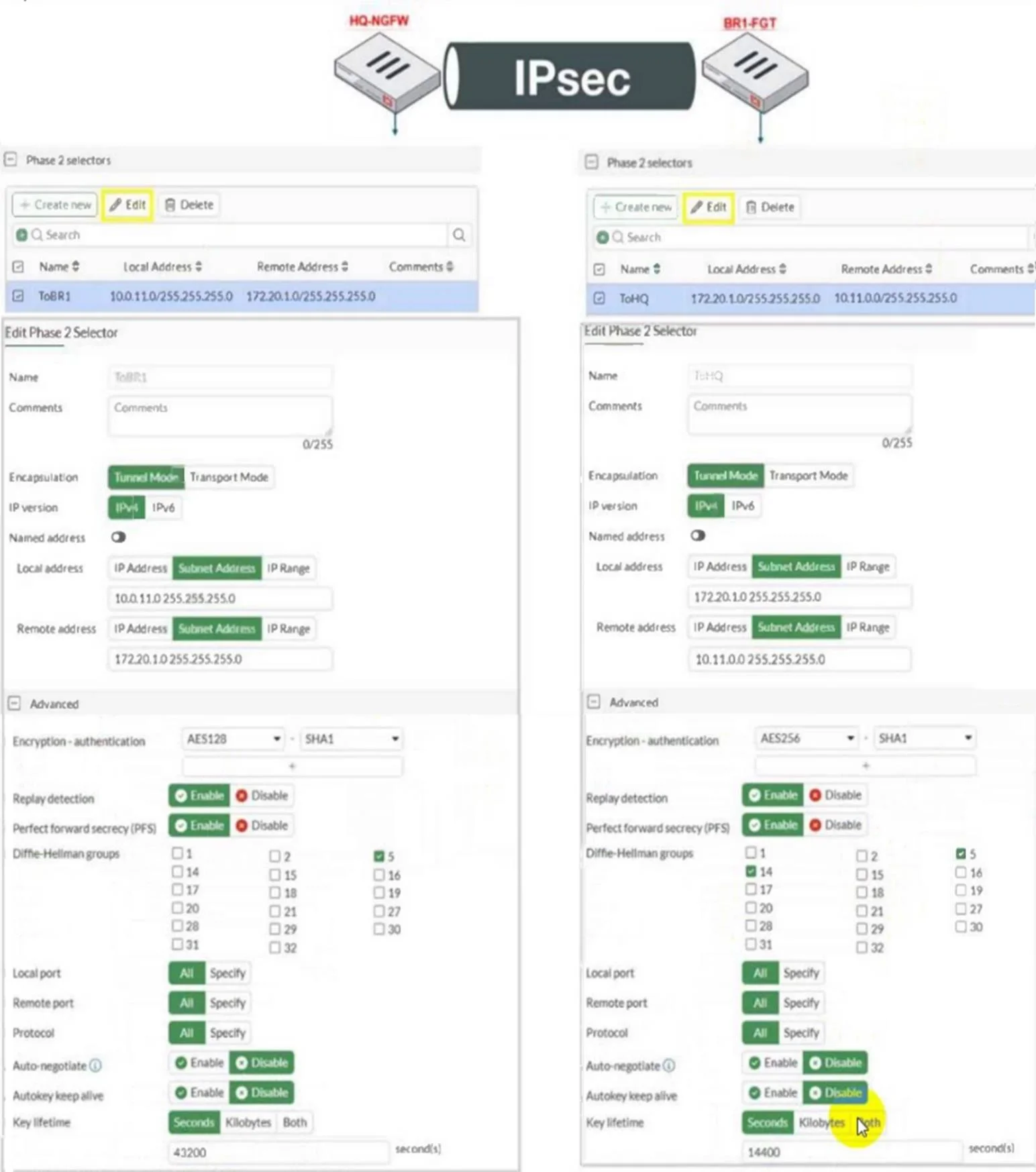
Refer to the exhibit. A network administrator is troubleshooting an IPsec tunnel between two FortiGate devices. The administrator has determined that phase 1 status is up, but phase 2 fails to come…
The correct answer is C. On BR1-FGT, set Remote Address to 10.0.11.0/255.255.255.0. D. On HQ-NGFW. set Encryption to AES256. Check the IP address The remote subnet selectors don’t match. Set BR1-FGT’s Remote Address to 10.0.11.0/255.255.255.0 (C). The phase-2 proposal algorithms don’t match. Change HQ-NGFW Encryption from AES128 to AES256 to match BR1-FGT (D).
Question
Refer to the exhibit. A network administrator is troubleshooting an IPsec tunnel between two FortiGate devices. The administrator has determined that phase 1 status is up, but phase 2 fails to come up. Based on the phase 2 configuration shown in the exhibit, which two configuration changes will bring phase 2 up? (Choose two.)
Exhibit
Options
- AOn BR1-FGT, set Seconds to 43200.
- BOn HQ-NGFW, enable Diffie-Hellman Group 2.
- COn BR1-FGT, set Remote Address to 10.0.11.0/255.255.255.0.
- DOn HQ-NGFW. set Encryption to AES256.
How the community answered
(36 responses)- A19% (7)
- B11% (4)
- C69% (25)
Explanation
Check the IP address The remote subnet selectors don’t match. Set BR1-FGT’s Remote Address to 10.0.11.0/255.255.255.0 (C). The phase-2 proposal algorithms don’t match. Change HQ-NGFW Encryption from AES128 to AES256 to match BR1-FGT (D).
Topics
Community Discussion
No community discussion yet for this question.