
FCP_FGT_AD-7.4 · Question #41
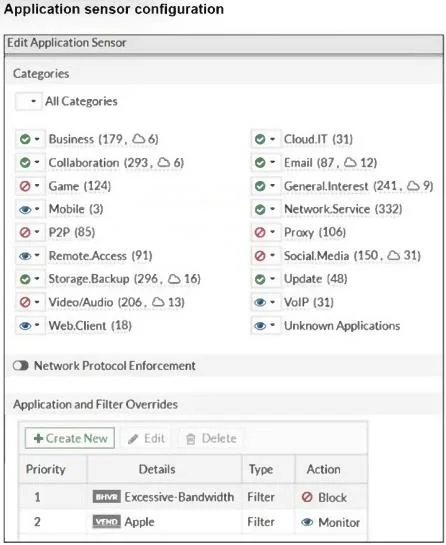
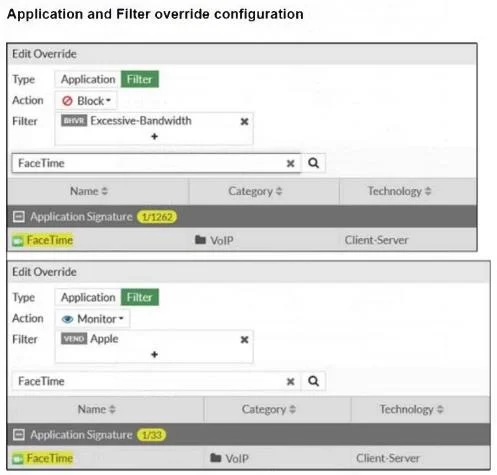
Refer to the exhibits. The exhibits show the application sensor configuration and the Excessive- Bandwidth and Apple filter details. Based on the configuration, what will happen to Apple FaceTime if…
The correct answer is D. Apple FaceTime will be blocked, based on the Excessive-Bandwidth filter configuration. The "Excessive-Bandwidth" filter is set to block, which includes "FaceTime" under its application signature. As a result, FaceTime will be blocked regardless of the "Apple" filter configuration because the "Excessive-Bandwidth" filter takes precedence due to its block action…
Question
Refer to the exhibits. The exhibits show the application sensor configuration and the Excessive- Bandwidth and Apple filter details. Based on the configuration, what will happen to Apple FaceTime if there are only a few calls originating or incoming?
Exhibits
Options
- AApple FaceTime will be allowed, based on the Video/Audio category configuration.
- BApple FaceTime will be allowed, based on the Apple filter configuration.
- CApple FaceTime will be allowed only if the Apple filter in Application and Filter Overrides is set to
- DApple FaceTime will be blocked, based on the Excessive-Bandwidth filter configuration.
How the community answered
(55 responses)- A7% (4)
- B13% (7)
- C4% (2)
- D76% (42)
Explanation
The "Excessive-Bandwidth" filter is set to block, which includes "FaceTime" under its application signature. As a result, FaceTime will be blocked regardless of the "Apple" filter configuration because the "Excessive-Bandwidth" filter takes precedence due to its block action setting.
Topics
Community Discussion
No community discussion yet for this question.