
Red_Hat
EX200 · Question #22
22. Set Root Password Set the root password of node2 to "redhat." You need to gain system access to perform this operation. Correct Answer: See the below explanation Explanation…
The root password is reset by booting into single-user mode, gaining a root shell on the sysroot filesystem, and using passwd --stdin to set the new password, followed by creating /.autorelabel for SELinux context restoration.
Submitted by lucia.co· Apr 18, 2026Perform essential system administration tasks
Question
- Set Root Password Set the root password of node2 to "redhat." You need to gain system access to perform this operation. Correct Answer: See the below explanation Explanation Explanation/Reference: Solution: ***Restart the node2 machine and wait for the screen shown in Exhibit 1. Press "e" to enter the screen shown in Exhibit 2. The original configuration is as shown in the image. Modify the original configuration to the part highlighted in red box, as shown in Exhibit 2. Then press "Ctrl+X" to execute the following commands: # chroot /sysroot # echo redhat |passwd --stdin root # touch /.autorelabel # sync # exit # reboot
Exhibit
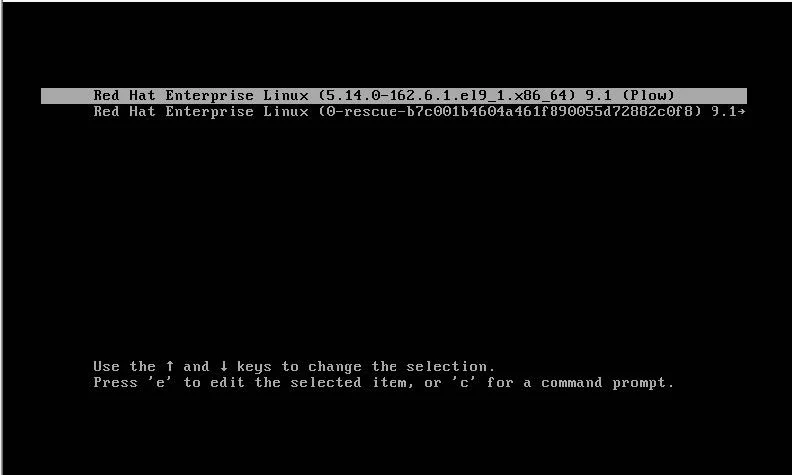
Explanation
The root password is reset by booting into single-user mode, gaining a root shell on the sysroot filesystem, and using passwd --stdin to set the new password, followed by creating /.autorelabel for SELinux context restoration.
Concept tested. Resetting root password in Linux
Reference. https://access.redhat.com/solutions/86623
Topics
#Root password reset#System recovery#GRUB boot parameters#Password management
Community Discussion
No community discussion yet for this question.