
EADP10 · Question #27
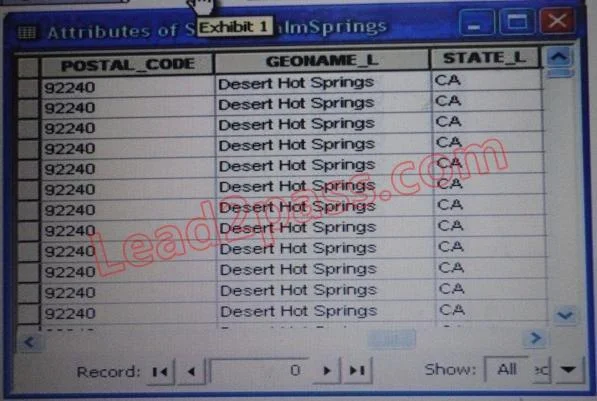
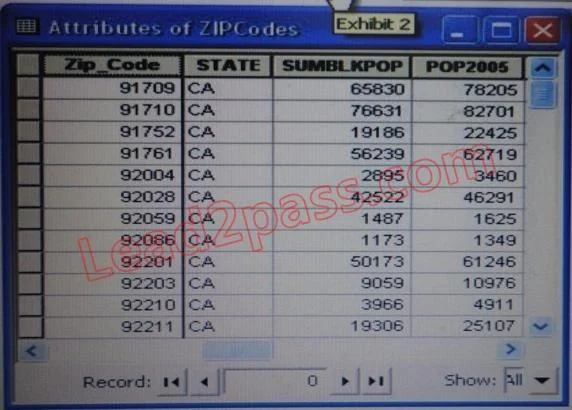
Refer to the exhibits. An ArcGIS user is attempting to create a relationship class between the two tables shown in the exhibit using POSTAL_CODE and Zip_Code as the origin primary key and…
Sign in or unlock EADP10 to reveal the answer and full explanation for question #27. The question stem and answer options stay visible for context.
Question
Refer to the exhibits. An ArcGIS user is attempting to create a relationship class between the two tables shown in the exhibit using POSTAL_CODE and Zip_Code as the origin primary key and destination foreign keys, respectively. However when the user tries to set the keys Zip_Code does not appear in the drop-down list of candidate keys. What should the user do to successfully create the relationship class? Esri EADP10 Exam
Exhibits
Options
- Achange the relationship type from non attributed to attributed
- Bmake sure both tables are in the same geodatabase
- Ccreate data type compatible key fields
- Dmove both tables to the same feature dataset
Unlock EADP10 to see the answer
You've previewed enough free EADP10 questions. Unlock EADP10 for full answers, explanations, the timed quiz mode, progress tracking, and the master PDF. Question stem and options stay visible so you can still see what's on the exam.