
Dell-EMC
E20-526 · Question #41
How should a storage administrator navigate to different XtremIO clusters from the XMS GUI if the administrator has more than one cluster managed by the same XMS?
Sign in or unlock E20-526 to reveal the answer and full explanation for question #41. The question stem and answer options stay visible for context.
Optimize and Troubleshoot XtremIO Deployments
Question
How should a storage administrator navigate to different XtremIO clusters from the XMS GUI if the administrator has more than one cluster managed by the same XMS?
Exhibit
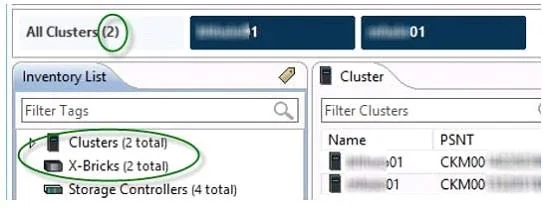
Options
- AClick the Cluster Name on the Menu bar near the top of the screen
- BClick the Inventory List button on the Menu bar
- CClick the Administration tab and locate the Cluster Name
- DClick the Cluster Name on the Status bar at the bottom of the screen
Unlock E20-526 to see the answer
You've previewed enough free E20-526 questions. Unlock E20-526 for full answers, explanations, the timed quiz mode, progress tracking, and the master PDF. Question stem and options stay visible so you can still see what's on the exam.
Topics
#XMS GUI navigation#multi-cluster management#inventory list#cluster selection