
E20-522 · Question #249
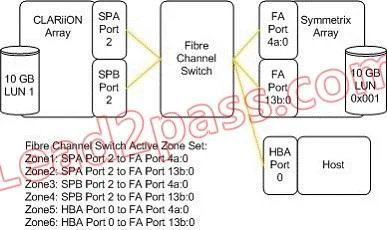
Click the Exhibit button. A customer is configuring SAN Copy from a source CLARiiON LUN to a destination Symmetrix LUN. The destination LUN is masked to a host connected to the Symmetrix. The…
Sign in or unlock E20-522 to reveal the answer and full explanation for question #249. The question stem and answer options stay visible for context.
Question
Click the Exhibit button. A customer is configuring SAN Copy from a source CLARiiON LUN to a destination Symmetrix LUN. The destination LUN is masked to a host connected to the Symmetrix. The CLARiiON SP ports are logged in to the Symmetrix FA ports. When the customer tries to select the destination storage from the SAN Copy Create Session Wizard, the storage destination is not shown. What can be done to make the storage destination visible in the SAN Copy Create Session Wizard?
Exhibit
Options
- AInstall and configureNavisphere Agent on the host
- BInstall and configure Solutions Enabler on the host
- CMask the LUN to theCLARiiON SP ports
- DZone the host to theCLARiiON SP ports
Unlock E20-522 to see the answer
You've previewed enough free E20-522 questions. Unlock E20-522 for full answers, explanations, the timed quiz mode, progress tracking, and the master PDF. Question stem and options stay visible so you can still see what's on the exam.