
Dell-EMC
E20-495 · Question #81
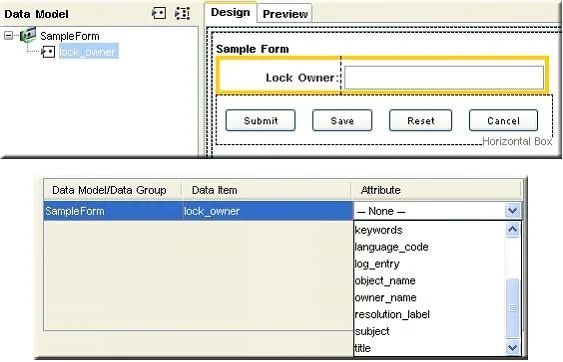
Refer to the exhibit. An application developer configures a form template in Forms Builder and wants to display the read-only attribute r_lock_owner on the form. In the Storage Mapping dialog…
The correct answer is D. Replace the text field with a bound static text. See the full explanation below for the reasoning.
Question
Refer to the exhibit. An application developer configures a form template in Forms Builder and wants to display the read-only attribute r_lock_owner on the form. In the Storage Mapping dialog, r_lock_owner attribute does not appear in the list for the data item corresponding to the control. What should the application developer do so r_lock_owner can be displayed on the form?
Exhibit
Options
- AChange the data item name to r_lock_owner so the names match.
- BConfigure r_lock_owner attribute in the custom type definition to be editable.
- CGrant the application developer the correct permission so the attribute is accessible.
- DReplace the text field with a bound static text.
How the community answered
(57 responses)- A16% (9)
- B11% (6)
- C4% (2)
- D70% (40)
Community Discussion
No community discussion yet for this question.