
DP-900 · Question #38
You are working as a Data Associate in an organization. Your client has accomplished the tasks with his Azure CosmoDB account and wants to delete it. He does not know about the steps to be followed…
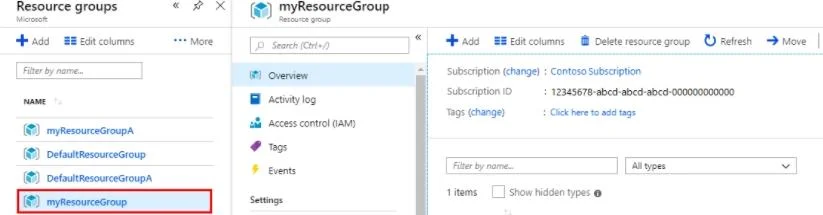
The correct answer is A. 2143. You can delete the Azure resources when you are done with them. In the same manner, when you are done with the Azure Cosmo DB, you can delete your Azure Cosmo DB account. The steps to delete an Azure Cosmo DB account are as below: 1. Search and Select Resource Groups in the…
Question
Exhibit
Options
- A2143
- B1342
- C4231
- D1234
How the community answered
(54 responses)- A91% (49)
- B6% (3)
- C2% (1)
- D2% (1)
Explanation
You can delete the Azure resources when you are done with them. In the same manner, when you are done with the Azure Cosmo DB, you can delete your Azure Cosmo DB account. The steps to delete an Azure Cosmo DB account are as below: 1. Search and Select Resource Groups in the Azure Portal Search Bar. 2. Select the created resource group. 3. Select Delete Resource Group on the Resource Group Overview Page. 4. Enter the name of the resource group you want to delete and select Delete. Option A is correct. Search and Select Resource Groups in the Azure Portal Search Bar, Select the created resource group, Select Delete Resource Group on the Resource Group Overview Page, Enter the name of the resource group you want to delete, and select Delete is the correct sequence of steps to delete an Azure Cosmo DB account. Option B is incorrect. 1342 doesn't form the correct sequence of steps for the deletion of an Azure Cosmo DB account. Option C is incorrect. 4321 doesn't form the correct sequence of steps for the deletion of an Azure Cosmo DB account. Option D is incorrect. 1234 doesn't form the correct sequence of steps for the deletion of an Azure Cosmo DB account. https://docs.microsoft.com/en-us/azure/cosmos-db/create-cosmosdb-resources-portal
Topics
Community Discussion
No community discussion yet for this question.