
DP-900 · Question #142
Drag and Drop Question Match the types of visualizations to the appropriate descriptions. To answer, drag the appropriate visualization type from the column on the left to its description on the…
The correct answer is Treemap; Key influencer; Scatter. The correct arrangement maps Treemap to hierarchical/proportional data displayed as nested rectangles, Key Influencer to identifying factors that drive a specific metric or outcome (using AI-powered analysis), and Scatter to showing the relationship or correlation between two…
Question
Exhibit
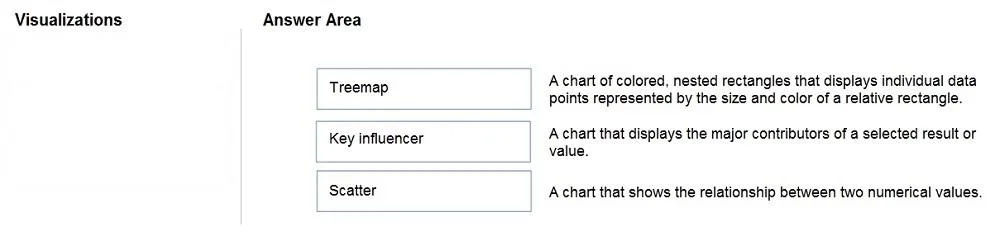
Answer Area
Drag items
Correct arrangement
- Treemap
- Key influencer
- Scatter
Explanation
The correct arrangement maps Treemap to hierarchical/proportional data displayed as nested rectangles, Key Influencer to identifying factors that drive a specific metric or outcome (using AI-powered analysis), and Scatter to showing the relationship or correlation between two numerical variables plotted on X and Y axes. Each visualization type has a distinct purpose: Treemap for part-to-whole hierarchical comparisons, Key Influencer for AI-driven root-cause analysis, and Scatter for correlation/distribution analysis between two continuous measures.
Topics
Community Discussion
No community discussion yet for this question.