
DP-600 · Question #34
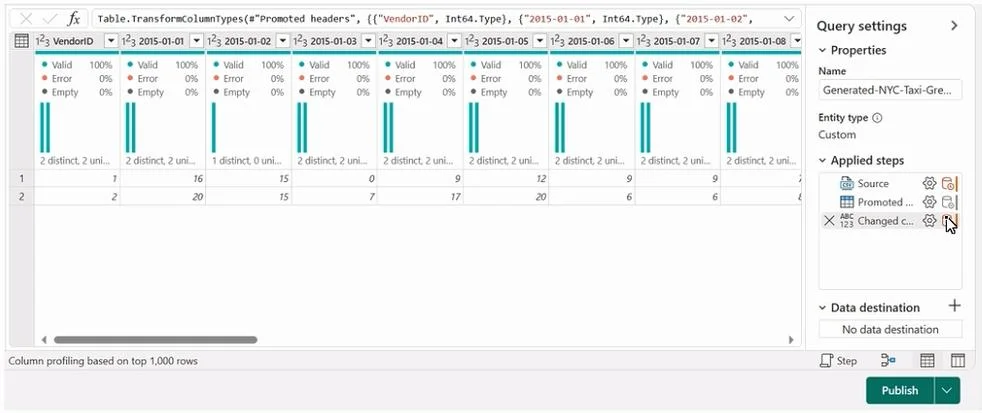
You have a Fabric workspace named Workspace1 that contains a data flow named Dataflow1 contains a query that returns the data shown in the following exhibit. You need to transform the data columns…
The correct answer is C. Unpivot other columns. To transform data columns into attribute-value pairs while retaining the VendorID as an identifier, the 'Unpivot other columns' transformation in Power Query should be selected.
Question
You have a Fabric workspace named Workspace1 that contains a data flow named Dataflow1 contains a query that returns the data shown in the following exhibit. You need to transform the data columns into attribute-value pairs, where columns become rows. You select the VendorID column. Which transformation should you select from the context menu of the VendorID column?
Exhibit
Options
- AGroup by
- BUnpivot columns
- CUnpivot other columns
- DSplit column
- ERemove other columns
How the community answered
(28 responses)- A4% (1)
- B11% (3)
- C79% (22)
- D7% (2)
Why each option
To transform data columns into attribute-value pairs while retaining the `VendorID` as an identifier, the 'Unpivot other columns' transformation in Power Query should be selected.
'Group by' is used to aggregate rows based on common values, not to restructure columns into rows for attribute-value pairs.
When 'Unpivot other columns' is selected after highlighting `VendorID`, all columns *other than* `VendorID` are transformed into two new columns: an 'Attribute' column (containing the original column headers) and a 'Value' column (containing their corresponding data), effectively creating attribute-value pairs.
Concept tested: Power Query unpivot transformation
Source: https://learn.microsoft.com/en-us/power-query/unpivot-columns
Topics
Community Discussion
No community discussion yet for this question.