
DP-420 · Question #83
Drag and Drop Question You have an Azure Synapse Analytics workspace named workspace1 that contains a serverless SQL pool. You have an Azure Table Storage account that stores operational data. You…
The correct answer is Create an Azure Cosmos DB core (SQL) API account; Enable Azure Synapse Link; Create a database and a container that has Analytical store enabled. To integrate Azure Cosmos DB with Azure Synapse Analytics for serverless queries while ensuring operational isolation and cost-efficiency, the correct sequence involves creating the Cosmos DB account, enabling Azure Synapse Link on the account, and then creating a container…
Question
Exhibit
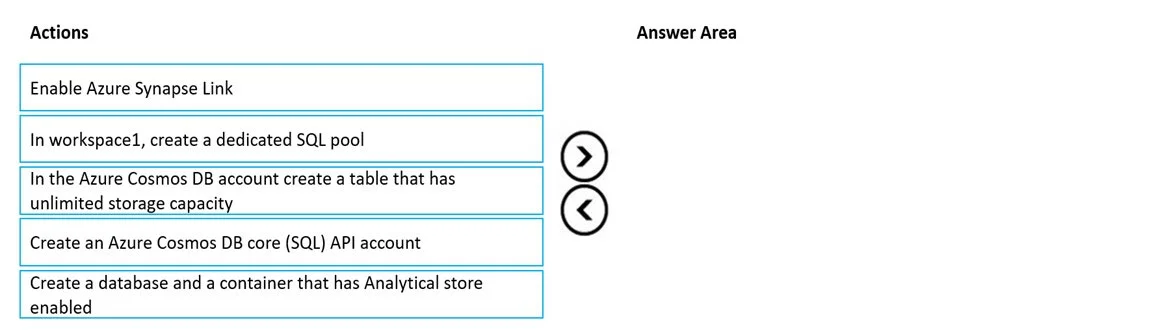
Answer Area
Drag items
Correct arrangement
- Create an Azure Cosmos DB core (SQL) API account
- Enable Azure Synapse Link
- Create a database and a container that has Analytical store enabled
Explanation
To integrate Azure Cosmos DB with Azure Synapse Analytics for serverless queries while ensuring operational isolation and cost-efficiency, the correct sequence involves creating the Cosmos DB account, enabling Azure Synapse Link on the account, and then creating a container with the Analytical store enabled.
Approach. The problem requires replacing Azure Table Storage with Azure Cosmos DB for NoSQL, supporting serverless SQL pool queries, ensuring analytical processes do not affect operational processes, and only paying for analytical compute when running queries. These requirements are perfectly met by Azure Synapse Link with Cosmos DB's Analytical Store.
To achieve this, the actions must be performed in the following sequence:
- 'Create an Azure Cosmos DB core (SQL) API account': This is the fundamental first step. You must provision the Azure Cosmos DB account itself before you can configure any features within it or link it to other services. The Core (SQL) API is specified as the target NoSQL solution.
- 'Enable Azure Synapse Link': Once the Cosmos DB account exists, Azure Synapse Link must be enabled at the account level. This capability is crucial as it allows for the near real-time, no-ETL integration between Cosmos DB's analytical store and Azure Synapse Analytics, which is key for meeting the requirements of operational isolation and cost-effective, serverless analytical processing.
- 'Create a database and a container that has Analytical store enabled': After enabling Synapse Link on the account, you then proceed to create the specific database and container where your operational data will reside. Critically, you must enable the Analytical store on this container. This creates a separate, column-oriented store optimized for large-scale analytical queries, directly addressing the requirements for operational isolation (by not using RUs from the transactional store) and pay-as-you-go analytical processing via the serverless SQL pool.
Common mistakes.
- common_mistake. 1. 'In workspace1, create a dedicated SQL pool': The question specifically states that queries should come from a 'serverless SQL pool'. A dedicated SQL pool is a different, provisioned (non-serverless) compute resource in Synapse Analytics and is not required for querying Cosmos DB via Synapse Link using a serverless SQL pool. This option is irrelevant to the stated requirements.
- 'In the Azure Cosmos DB account create a table that has unlimited storage capacity': This option uses incorrect terminology ('table' instead of 'container' for the SQL API). More importantly, while Cosmos DB containers do offer virtually unlimited storage, simply creating a regular container does not fulfill the critical requirements of operational isolation and pay-as-you-go analytics as effectively as explicitly enabling the Analytical store on a container, which is the precise feature being tested.
- Incorrect sequence of the correct actions: Forgetting to create the Cosmos DB account first, or attempting to enable Synapse Link on an account that doesn't exist, would be an obvious error. Similarly, trying to create a container with an analytical store enabled before Azure Synapse Link is enabled on the Cosmos DB account would lead to an invalid configuration, as Synapse Link is a prerequisite for using the analytical store feature.
Concept tested. Azure Synapse Link for Azure Cosmos DB, Azure Cosmos DB Analytical Store versus Transactional Store, Azure Cosmos DB Core (SQL) API, Integration between Azure Synapse Analytics serverless SQL pools and Azure Cosmos DB, Isolation of analytical and operational workloads, and cost-efficient analytical processing.
Topics
Community Discussion
No community discussion yet for this question.