
DP-420 · Question #39
Drag and Drop Question You have an app that stores data in an Azure Cosmos DB for NoSQL account The app performs queries that return large result sets. You need to return a complete result set to…
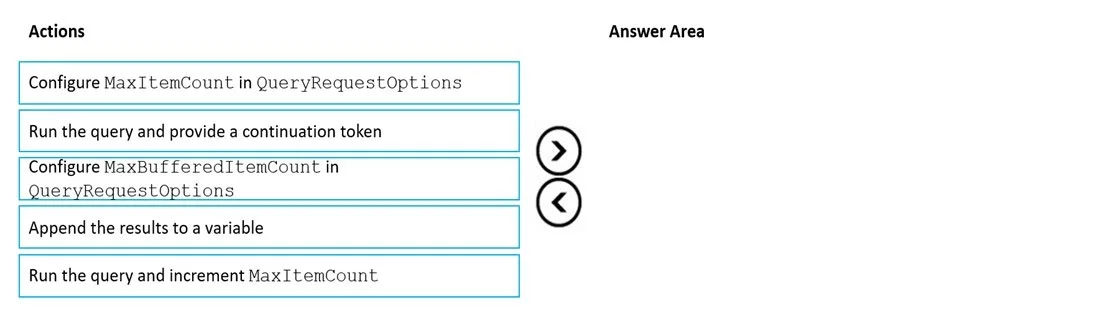
The correct answer is Configure MaxItemCount in QueryRequestOptions; Run the query and provide a continuation token; Append the results to a variable. To paginate Azure Cosmos DB query results with a specific page size, first configure the maximum items per page, then repeatedly run the query using continuation tokens, and finally accumulate the results.
Question
Exhibit
Answer Area
Drag items
Correct arrangement
- Configure MaxItemCount in QueryRequestOptions
- Run the query and provide a continuation token
- Append the results to a variable
Explanation
To paginate Azure Cosmos DB query results with a specific page size, first configure the maximum items per page, then repeatedly run the query using continuation tokens, and finally accumulate the results.
Approach. The scenario requires returning a complete result set by using pagination, with each page returning 80 items from an Azure Cosmos DB for NoSQL account. This involves setting the page size and iteratively fetching pages using continuation tokens. The correct sequence of actions is:
- Configure MaxItemCount in QueryRequestOptions: The
MaxItemCountproperty inQueryRequestOptionsexplicitly controls the maximum number of items that will be returned in a single page (response) from the Cosmos DB query. To get 80 items per page, this property must be set to 80. - Run the query and provide a continuation token: After setting the page size, the query needs to be executed. Cosmos DB uses continuation tokens for pagination. The first time the query is run, no continuation token is provided. For subsequent pages, the continuation token received from the previous query response must be passed to retrieve the next page of results. This action encapsulates the core loop of fetching pages until the continuation token is null.
- Append the results to a variable: As each page of results is returned from the query, these items need to be collected or accumulated into a variable (e.g., a list or array) to form the 'complete result set' as required by the problem statement. This action would typically occur within the loop after each query execution.
Common mistakes.
- common_mistake. A common mistake would be to choose 'Configure MaxBufferedItemCount in QueryRequestOptions'. While
MaxBufferedItemCountis aQueryRequestOptionsproperty, it's used to control the number of items that can be buffered during parallel query execution for improved performance, not to define the number of items per page in a sequential pagination scenario. Another incorrect choice would be 'Run the query and increment MaxItemCount'.MaxItemCountdefines the page size and should be set once to the desired value (80 in this case); it should not be incremented, as that would change the page size dynamically and not fulfill the requirement of 'each page of results must return 80 items'. Not including 'Run the query and provide a continuation token' would mean not performing the actual pagination logic, and not including 'Append the results to a variable' would mean not collecting the full result set.
Concept tested. Azure Cosmos DB for NoSQL query pagination, specifically using MaxItemCount and continuation tokens to control page size and iterate through query results.
Reference. https://learn.microsoft.com/en-us/azure/cosmos-db/nosql/query/pagination
Topics
Community Discussion
No community discussion yet for this question.