
DP-420 · Question #209
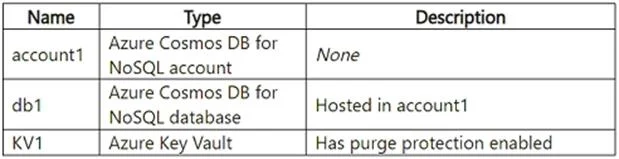
Drag and Drop Question You have an Azure subscription that contains the resources shown in the following table. You need to create a container in db1 that has the following attributes: - Name…
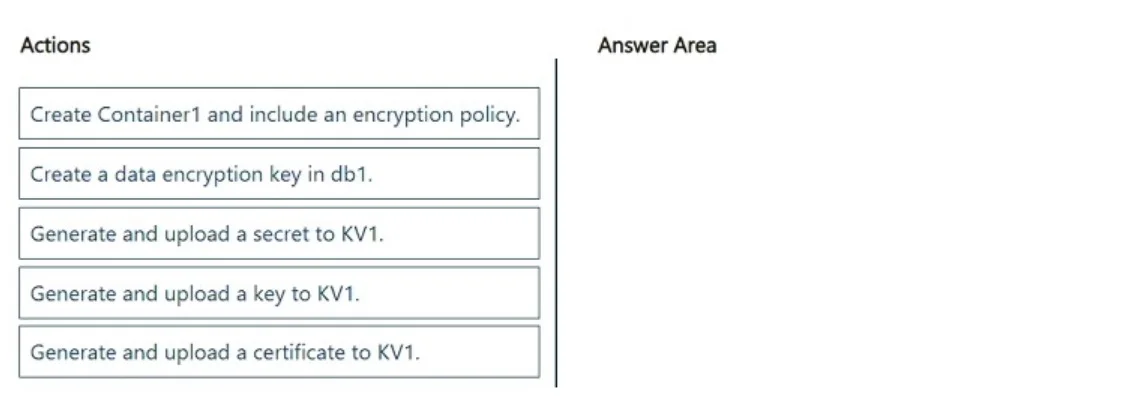
The correct answer is Generate and upload a key to KV1.; Create a data encryption key in db1.; Create Container1 and include an encryption policy. The question tests the understanding of client-side encryption (Always Encrypted) implementation in Azure Cosmos DB using Azure Key Vault, requiring the correct sequence of key generation, data encryption key creation, and container setup with an encryption policy.
Question
Drag and Drop Question You have an Azure subscription that contains the resources shown in the following table. You need to create a container in db1 that has the following attributes:
- Name: Container1
- Encryption: Client-side encryption with Always Encrypted
Which three actions should you perform in sequence? To answer, move the appropriate actions from the list of actions to the answer area and arrange them in the correct order. Answer:
Exhibits
Answer Area
Drag items
Correct arrangement
- Generate and upload a key to KV1.
- Create a data encryption key in db1.
- Create Container1 and include an encryption policy.
Explanation
The question tests the understanding of client-side encryption (Always Encrypted) implementation in Azure Cosmos DB using Azure Key Vault, requiring the correct sequence of key generation, data encryption key creation, and container setup with an encryption policy.
Approach. To implement client-side encryption with Always Encrypted for an Azure Cosmos DB container, a hierarchical key management approach is required. The correct sequence of actions is:
- Generate and upload a key to KV1: The first step is to establish a Column Master Key (CMK) in a secure key store. Azure Key Vault (KV1) is specified as the store. For Always Encrypted, the CMK is a cryptographic key, not a secret or certificate. This CMK will be used to encrypt the Column Encryption Key (CEK).
- Create a data encryption key in db1: Next, a Column Encryption Key (CEK) needs to be created within the Cosmos DB database (db1). This CEK is the key that will directly encrypt the data in the container. When created, this CEK is itself encrypted by the CMK stored in KV1.
- Create Container1 and include an encryption policy: Finally, when creating the container (Container1), an encryption policy must be defined. This policy specifies which fields or properties within the container will be encrypted and which Column Encryption Key (CEK) (created in the previous step) should be used for that encryption. This step binds the encryption mechanism to the data structure. This sequence ensures that the master key is secured, the data encryption key is protected by the master key, and the container is configured to use this encryption scheme upon creation.
Common mistakes.
- common_mistake. - Using 'Generate and upload a secret to KV1' or 'Generate and upload a certificate to KV1': Always Encrypted specifically uses cryptographic keys as Column Master Keys (CMKs) to encrypt Column Encryption Keys (CEKs). Secrets are generic key-value pairs, and certificates are primarily for identity and secure communication, not for master encryption keys in this context.
- Incorrect order of operations:
- Attempting to create a data encryption key in db1 before generating the master key in KV1 is incorrect because the data encryption key must be encrypted by the master key.
- Attempting to create Container1 with an encryption policy before the data encryption key exists is incorrect because the policy needs to reference an existing data encryption key.
- Putting "Create Container1 and include an encryption policy" before "Generate and upload a key to KV1" or "Create a data encryption key in db1" would fail because the underlying keys and infrastructure for encryption would not be in place.
- The hierarchy for Always Encrypted dictates that the master key (in KV1) must exist first, then the data encryption key (in in db1) which is protected by the master key, and finally, the container is created referencing the data encryption key via an encryption policy.
Concept tested. Azure Cosmos DB client-side encryption (Always Encrypted) implementation, including the roles of Azure Key Vault for Column Master Keys, creating Column Encryption Keys within Cosmos DB, and defining encryption policies for containers. It tests the understanding of the key hierarchy and the sequential steps required for secure data at rest.
Topics
Community Discussion
No community discussion yet for this question.