
DP-420 · Question #200
Drag and Drop Question You have an Azure Cosmos DB for NoSQL account named account1 that has a periodic backup policy with a four-hour backup interval and an eight-hour retention period. The…
The correct answer is Submit a request ticket.; Migrate the data. To restore an accidentally deleted Azure Cosmos DB database with a periodic backup policy, the correct procedure involves securing existing backups, contacting Azure Support, and then migrating the restored data.
Question
Drag and Drop Question You have an Azure Cosmos DB for NoSQL account named account1 that has a periodic backup policy with a four-hour backup interval and an eight-hour retention period. The account1 account contains a single database named db1 and containers that have stored procedures. An administrator deletes db1 accidentally. You need to ensure that the contents of db1, including all of its items, is available as soon as possible. How should you perform the procedure? To answer, drag the missing actions to the correct order. Each action may be used once, more than once, or not at all. You may need to drag the split bar between panes or scroll to view content. NOTE: Each correct selection is worth one point. Answer:
Exhibit
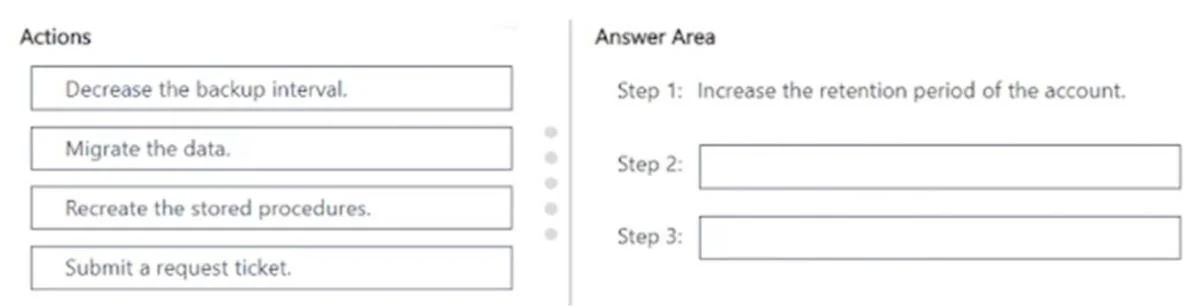
Answer Area
Drag items
Correct arrangement
- Submit a request ticket.
- Migrate the data.
Explanation
To restore an accidentally deleted Azure Cosmos DB database with a periodic backup policy, the correct procedure involves securing existing backups, contacting Azure Support, and then migrating the restored data.
Approach. The scenario describes an accidental deletion of 'db1' in an Azure Cosmos DB for NoSQL account ('account1') which uses a periodic backup policy (4-hour interval, 8-hour retention). The goal is to make the contents of 'db1' available as soon as possible. The correct sequence of actions is:
-
Step 1: Increase the retention period of the account. (This step is pre-filled in the question, suggesting its necessity). While this doesn't directly restore data, it's a critical preventative measure. If 'db1' was deleted, and the retention is 8 hours, it ensures that a recent backup point is not purged before Azure Support can begin the restoration process. Increasing retention provides a buffer, securing the last valid backup for a longer duration while waiting for support.
-
Step 2: Submit a request ticket. For Azure Cosmos DB accounts configured with periodic backup mode, data restoration is not a self-service operation. You must contact Azure Support to initiate the restore process from a periodic backup. This is the direct and fastest path to begin recovering the deleted database.
-
Step 3: Migrate the data. When Azure Support restores data from a periodic backup, they typically restore it to a new Azure Cosmos DB account. This means the original account is not restored in place. After the support team has completed the restoration to a new account, the administrator is responsible for migrating the restored data (which includes all items and database objects like stored procedures) from this newly created account back to the original production account or a designated replacement to make it fully 'available' in the desired environment.
Common mistakes.
- common_mistake. 1. Decrease the backup interval: This action only affects future backups and is irrelevant for restoring data that has already been deleted. It does not help in recovering past data.
- Recreate the stored procedures: Stored procedures are database objects that are part of the database's contents. If the entire database 'db1' is restored from a backup, its stored procedures should also be included in that restoration. Therefore, explicitly 'recreating' them as a separate primary step is generally unnecessary. The 'Migrate the data' step would encompass moving all restored content, including stored procedures, to the target location.
- Attempting self-service restore: A common mistake for periodic backup mode is to assume self-service restoration is possible, as it is with continuous backup mode. Not submitting a request ticket immediately will significantly delay the recovery process.
Concept tested. Azure Cosmos DB backup and restore mechanisms, specifically understanding the limitations and procedures for periodic backup mode (requiring Azure Support for restoration), the implications of backup retention policies, and the post-restoration steps for data availability.
Topics
Community Discussion
No community discussion yet for this question.