
DP-420 · Question #10
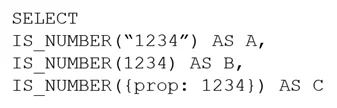
You have an Azure Cosmos DB for NoSQL account. You run the following query against a container in the account. What is the output of the query?
The correct answer is A. [{"A": false, "B": true, "C": false}]. The output is [{"A": false, "B": true, "C": false}]. This question tests Cosmos DB's handling of NULL and UNDEFINED values. Unlike ANSI SQL, Cosmos DB SQL treats null = null as false (producing result A=false), while IS_NULL(null) correctly returns true (producing result…
Question
You have an Azure Cosmos DB for NoSQL account. You run the following query against a container in the account. What is the output of the query?
Exhibit
Options
- A[{"A": false, "B": true, "C": false}]
- B[{"A": true, "B": false, "C": true}]
- C[{"A": true, "B": true, "C": false}]
- D[{"A": true, "B": true, "C": true}]
How the community answered
(41 responses)- A95% (39)
- B2% (1)
- C2% (1)
Explanation
The output is [{"A": false, "B": true, "C": false}]. This question tests Cosmos DB's handling of NULL and UNDEFINED values. Unlike ANSI SQL, Cosmos DB SQL treats null = null as false (producing result A=false), while IS_NULL(null) correctly returns true (producing result B=true). Comparing an undefined/missing property with any value, including null, also returns false (producing result C=false). These behaviors reflect Cosmos DB's JSON-native semantics where type-checking functions like IS_NULL and IS_DEFINED are the correct way to test for absent or null values, rather than equality operators.
Topics
Community Discussion
No community discussion yet for this question.