
Microsoft
DP-300 · Question #87
Drag and Drop Question You have an Azure SQL Database instance named DatabaseA on a server named Server1. You plan to add a new user named App1 to DatabaseA and grant App1 db_datacenter permissions…
Sign in or unlock DP-300 to reveal the answer and full explanation for question #87. The question stem and answer options stay visible for context.
Submitted by neha2k· Mar 6, 2026Implement and manage database security in Azure SQL Database, including creating server-level logins, database users, and role assignments to control access across multiple databases.
Question
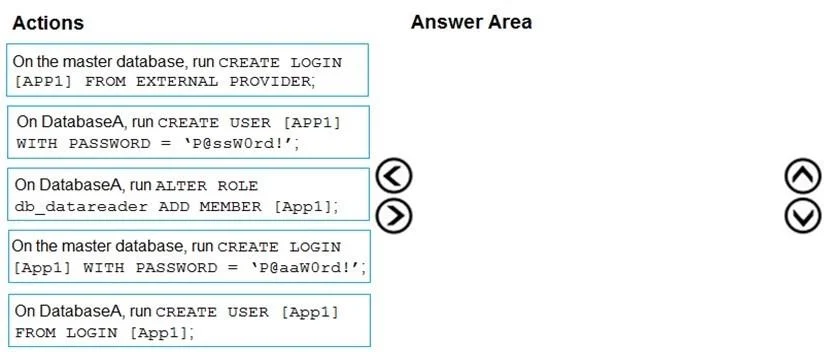
Drag and Drop Question You have an Azure SQL Database instance named DatabaseA on a server named Server1. You plan to add a new user named App1 to DatabaseA and grant App1 db_datacenter permissions. App1 will use SQL Server Authentication. You need to create App1. The solution must ensure that App1 can be given access to other databases by using the same credentials. Which three actions should you perform in sequence? To answer, move the appropriate actions from the list of actions to the answer area and arrange them in the correct order. Answer:
Exhibit
Answer Area
Drag items
On the master database, run CREATE LOGIN [App1] FROM EXTERNAL PROVIDER.On DatabaseA, run CREATE USER [App1] WITH PASSWORD = '@ssWord!'.On DatabaseA, run ALTER ROLE db_datareader ADD MEMBER [App1];On the master database, run CREATE LOGIN [App1] WITH PASSWORD = 'P@aaWord!'.On DatabaseA, run CREATE USER [App1] FROM LOGIN [App1].
Unlock DP-300 to see the answer
You've previewed enough free DP-300 questions. Unlock DP-300 for full answers, explanations, the timed quiz mode, progress tracking, and the master PDF. Question stem and options stay visible so you can still see what's on the exam.
Topics
#Azure SQL Database#SQL Server Authentication#Database Security#Logins and Users