
DP-300 · Question #50
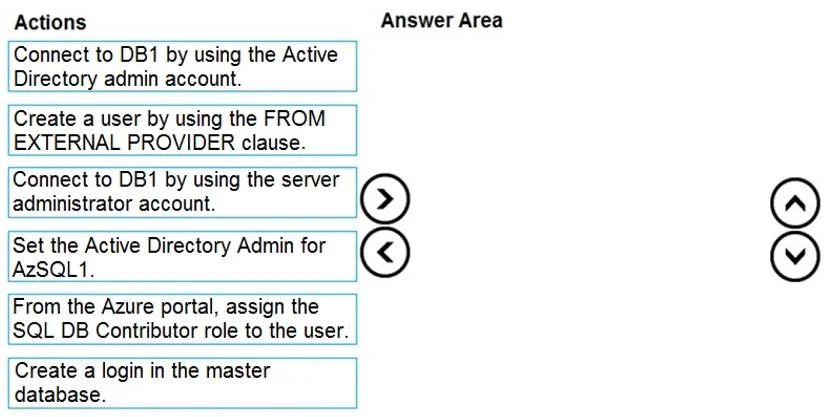
Drag and Drop Question You have a new Azure SQL database named DB1 on an Azure SQL server named AzSQL1. The only user who was created is the server administrator. You need to create a contained…
The correct answer is Set the Active Directory Admin for AzSQL1.; Connect to DB1 by using the Active Directory admin account.; Create a user by using the FROM EXTERNAL PROVIDER clause. To create a contained database user authenticated via Azure AD, you must first configure an Azure AD admin for the SQL server (AzSQL1), because only an Azure AD admin can create Azure AD-based users. Then, you connect to DB1 using that Active Directory admin account (not the…
Question
Exhibit
Answer Area
Drag items
Correct arrangement
- Set the Active Directory Admin for AzSQL1.
- Connect to DB1 by using the Active Directory admin account.
- Create a user by using the FROM EXTERNAL PROVIDER clause.
Explanation
To create a contained database user authenticated via Azure AD, you must first configure an Azure AD admin for the SQL server (AzSQL1), because only an Azure AD admin can create Azure AD-based users. Then, you connect to DB1 using that Active Directory admin account (not the server admin), and finally execute CREATE USER with the FROM EXTERNAL PROVIDER clause, which maps the Azure AD identity directly into the contained database without requiring a login in master.
Topics
Community Discussion
No community discussion yet for this question.