
DP-300 · Question #474
Drag and Drop Question You have a highly available Azure SQL Managed Instance that contains two servers named Server1 and Server2. Both servers are in the same Azure region. You have a failover…
The correct answer is Create a new server named Server3 and add Server3 to the same DNS zone as Server1.; Delete FG1, recreate a failover group that has the same name, and add Server2 and Server3 to the new group.; Perform a manual failover from Server2 to Server3. After failing over to Server2, you need to migrate the active workload to a new Azure region. The correct sequence is: (1) Create Server3 in the new region and add it to the SAME DNS zone as Server1 - this is critical because Azure SQL Managed Instance failover groups rely on…
Question
Exhibit
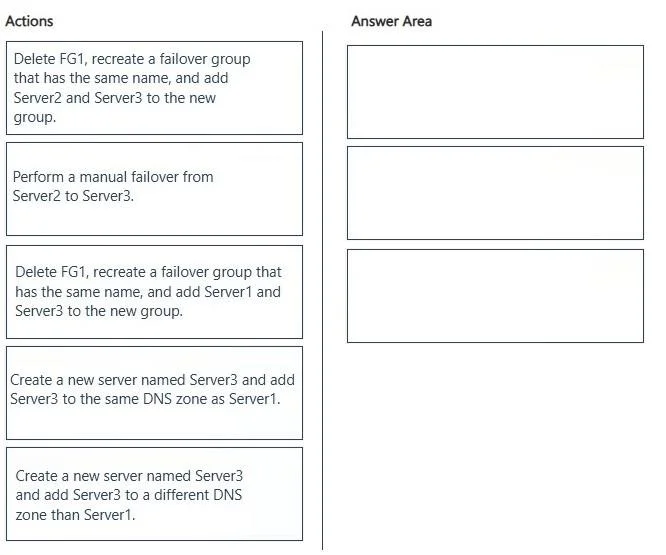
Answer Area
Drag items
Correct arrangement
- Create a new server named Server3 and add Server3 to the same DNS zone as Server1.
- Delete FG1, recreate a failover group that has the same name, and add Server2 and Server3 to the new group.
- Perform a manual failover from Server2 to Server3.
Explanation
After failing over to Server2, you need to migrate the active workload to a new Azure region. The correct sequence is: (1) Create Server3 in the new region and add it to the SAME DNS zone as Server1 - this is critical because Azure SQL Managed Instance failover groups rely on DNS zone matching to enable replication between instances. (2) Delete FG1 and recreate it with the same name adding Server2 and Server3 - you must use the same failover group name to preserve the endpoint DNS name that applications connect to, and Server2 (current primary) must be paired with Server3 (new region target). (3) Perform a manual failover from Server2 to Server3 - this makes Server3 in the new region the active primary, completing the regional migration.
Topics
Community Discussion
No community discussion yet for this question.