
DP-300 · Question #451
Hotspot Question You have an Azure subscription that contains an Azure SQL database named DB1 and a managed identity. You need to create a user in DB1 that will be used by the managed identity to…
The correct answer is FROM: EXTERNAL PROVIDER; WITH: OBJECT_ID. This question tests knowledge of creating an Azure AD (Entra ID) external user in an Azure SQL Database for use by a managed identity, using the correct T-SQL syntax.
Question
Exhibit
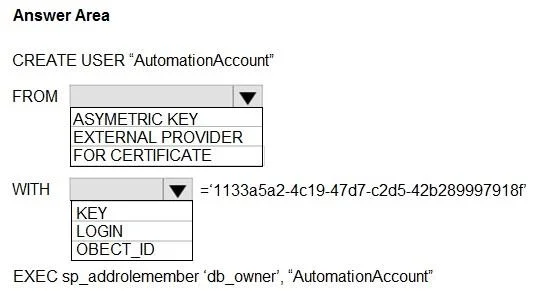
Answer Area
- FROMEXTERNAL PROVIDERASYMETRIC KEYEXTERNAL PROVIDERFOR CERTIFICATE
- WITHOBJECT_IDKEYLOGINOBJECT_ID
Explanation
This question tests knowledge of creating an Azure AD (Entra ID) external user in an Azure SQL Database for use by a managed identity, using the correct T-SQL syntax.
Approach. To create a database user for a managed identity, you use the T-SQL statement: CREATE USER [managed_identity_name] FROM EXTERNAL PROVIDER. The keyword 'FROM EXTERNAL PROVIDER' is critical because it tells Azure SQL to look up the identity in Azure Active Directory (Entra ID) rather than creating a local SQL authentication user. The managed identity name (object name as registered in Entra ID) is placed in brackets as the user name, and no password is specified since authentication is handled via Azure AD tokens. The complete query follows the pattern: CREATE USER [<managed_identity_name>] FROM EXTERNAL PROVIDER;
Concept tested. Creating Azure Active Directory (Entra ID) external users in Azure SQL Database for managed identity authentication using the 'FROM EXTERNAL PROVIDER' T-SQL clause, as opposed to SQL authentication (FROM LOGIN) or Windows authentication.
Topics
Community Discussion
No community discussion yet for this question.