
DP-300 · Question #444
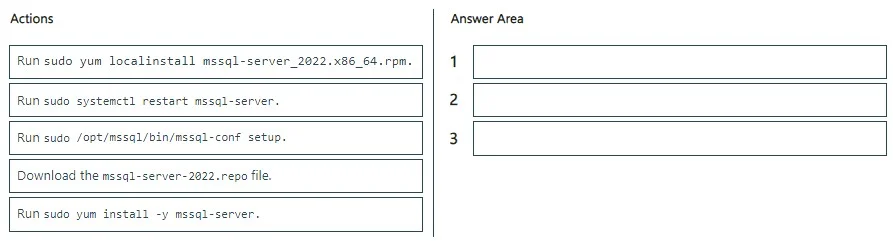
Drag and Drop Question You have an Azure virtual machine named VM1 that runs Red Hat Enterprise Linux (RHEL). You need to install and configure Microsoft SQL Server 2022 Standard on VM1. Which three…
The correct answer is Download the mssql-server-2022.repo file.; Run sudo yum localinstall mssql-server_2022.x86_64.rpm.; Run sudo /opt/mssql/bin/mssql-conf setup. Installing SQL Server on RHEL follows a specific three-step process: first, you download and configure the Microsoft SQL Server repository file (mssql-server-2022.repo) so that the package manager knows where to find the SQL Server packages. Second, you install the SQL Server…
Question
Exhibit
Answer Area
Drag items
Correct arrangement
- Download the mssql-server-2022.repo file.
- Run sudo yum localinstall mssql-server_2022.x86_64.rpm.
- Run sudo /opt/mssql/bin/mssql-conf setup.
Explanation
Installing SQL Server on RHEL follows a specific three-step process: first, you download and configure the Microsoft SQL Server repository file (mssql-server-2022.repo) so that the package manager knows where to find the SQL Server packages. Second, you install the SQL Server package using 'sudo yum localinstall mssql-server_2022.x86_64.rpm', which installs the binaries. Third, you run 'sudo /opt/mssql/bin/mssql-conf setup' to perform initial configuration, including setting the SA password and selecting the SQL Server edition (Standard in this case). This sequence mirrors Microsoft's official documentation for SQL Server on Linux.
Topics
Community Discussion
No community discussion yet for this question.