
DP-300 · Question #388
Hotspot Question You have an Azure SQL managed instance named Server1 and an Azure Blob Storage account named storage1 that contains Microsoft SQL Server database backup files. You plan to use Log…
To initiate a SQL database migration using Log Replay Service with the highest security, use the Start-AzSqlInstanceDatabaseLogReplay cmdlet and authenticate to Azure Blob Storage via ManagedIdentity.
Question
Exhibit
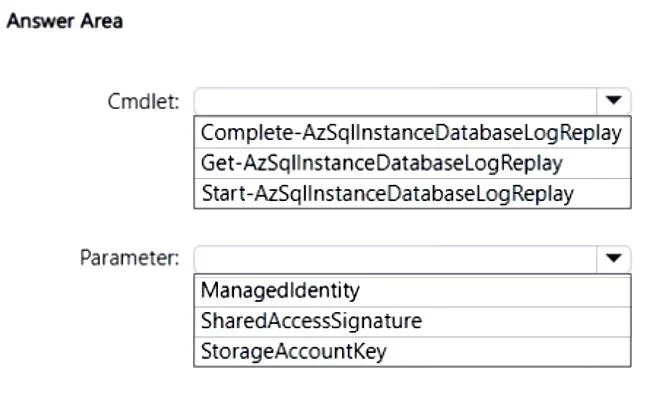
Answer Area
- CmdletComplete-AzSqlInstanceDatabaseLogReplayGet-AzSqlInstanceDatabaseLogReplayStart-AzSqlInstanceDatabaseLogReplay
- ParameterManagedIdentitySharedAccessSignatureStorageAccountKey
Explanation
To initiate a SQL database migration using Log Replay Service with the highest security, use the Start-AzSqlInstanceDatabaseLogReplay cmdlet and authenticate to Azure Blob Storage via ManagedIdentity.
Approach. The scenario requires initiating the Log Replay Service (LRS) to migrate backup files from Azure Blob Storage to an Azure SQL Managed Instance, specifically emphasizing the highest level of security for the storage connection.
-
Cmdlet Selection: The
Start-AzSqlInstanceDatabaseLogReplaycmdlet is used to begin a log replay operation, which is the initial step for migrating a database using LRS. The term 'plan to use Log Replay Service to migrate' directly indicates the need to start the service.Complete-AzSqlInstanceDatabaseLogReplayis for finishing an LRS operation after the replay has caught up, andGet-AzSqlInstanceDatabaseLogReplayis for retrieving its status, neither of which initiates the migration. -
Parameter Selection: When 'highest level of security' is a requirement for Azure services interacting with other Azure services (like SQL Managed Instance connecting to Blob Storage),
ManagedIdentityis the gold standard. Managed Identities eliminate the need for developers to manage credentials, as Azure automatically handles the creation, rotation, and lifecycle of the identity, providing secure, automatic authentication. This approach adheres to the principle of least privilege and reduces the risk of credential leakage.
Therefore, selecting Start-AzSqlInstanceDatabaseLogReplay for the Cmdlet and ManagedIdentity for the Parameter correctly addresses both the operational and security requirements.
Common mistakes.
- common_mistake. 1. Incorrect Cmdlet Choices: Choosing
Complete-AzSqlInstanceDatabaseLogReplayorGet-AzSqlInstanceDatabaseLogReplayis incorrect because the scenario describes planning to use the service for migration, implying initiation, not completion or status retrieval.
- Incorrect Parameter Choices:
StorageAccountKey: Using a storage account key provides full administrative access to the entire storage account. If compromised, it grants unrestricted access to all data. It's generally considered the least secure method for programmatic access in production environments and directly contradicts the 'highest level of security' requirement.SharedAccessSignature(SAS): A SAS token provides delegated access with fine-grained permissions and a specified validity period. While more secure than a full storage account key, it still involves managing and securing the SAS token itself (e.g., how it's generated, distributed, and revoked). It introduces credential management overhead that a Managed Identity eliminates, making it a less secure option compared to Managed Identity for inter-service communication where Managed Identity is available.
Concept tested. Azure SQL Managed Instance Log Replay Service (LRS) initiation, Azure Storage authentication methods, and Azure security best practices for inter-service communication, specifically the use of Managed Identities for secure credential-less authentication.
Topics
Community Discussion
No community discussion yet for this question.