
DP-300 · Question #386
Hotspot Question You have an Azure subscription that contains a resource group named RG1. RG1 contains an Azure SQL Server named Server1 in the West US Azure region. You need to ensure that any…
The correct answer is az sql server command: firewall-rule; Command parameters: --start-ip-address 0.0.0.0 --end-ip-address 0.0.0.0. To allow any Azure services to access an Azure SQL Server, you must create a server-level firewall rule with a start and end IP address of 0.0.0.0.
Question
Exhibit
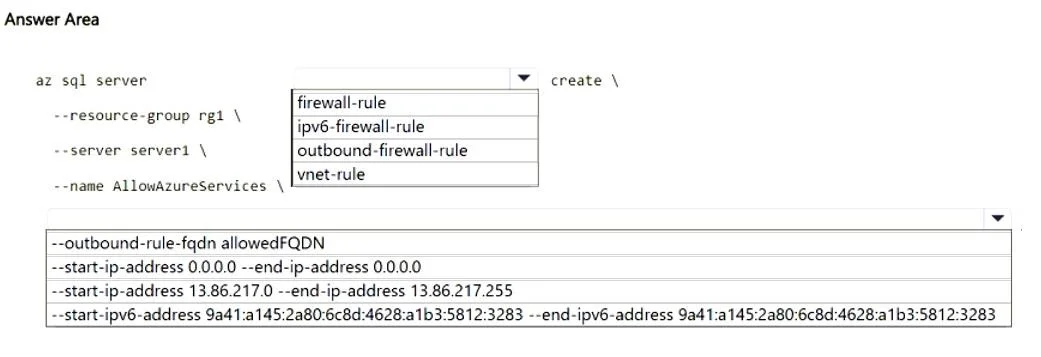
Answer Area
- az sql server commandfirewall-rulefirewall-ruleipv6-firewall-ruleoutbound-firewall-rulevnet-rule
- Command parameters--start-ip-address 0.0.0.0 --end-ip-address 0.0.0.0--outbound-rule-fqdn allowedFQDN--start-ip-address 0.0.0.0 --end-ip-address 0.0.0.0--start-ip-address 13.86.217.0 --end-ip-address 13.86.217.255--start-ipv6-address 9a41:a145:2a80:6c8d:4628:a1b3:5812:3283 --end-ipv6-address 9a41:a145:2a80:6c8d:4628:a1b3:5812:3283
Explanation
To allow any Azure services to access an Azure SQL Server, you must create a server-level firewall rule with a start and end IP address of 0.0.0.0.
Approach. The scenario requires ensuring that 'any Azure services' deployed to RG1 can access Server1. This is a common requirement for Azure SQL Servers. To achieve this via the Azure CLI, you need to:
-
Select the correct subcommand: The command
az sql serverneeds to be followed by thefirewall-rulesubcommand to manage server-level firewall rules for the SQL Server. The full command structure for creating a firewall rule isaz sql server firewall-rule create.firewall-ruleis the appropriate choice as we are defining an inbound access rule.
-
Define the rule to allow Azure services: Azure SQL Database servers have a special firewall rule that, when configured, allows connections from any Azure service within any Azure region. This is achieved by setting both the start and end IP addresses of the rule to
0.0.0.0.- Therefore,
--start-ip-address 0.0.0.0 --end-ip-address 0.0.0.0is the correct selection for the rule definition. The nameAllowAzureServicesis already provided in the command, which is a common practice for this specific rule.
- Therefore,
Common mistakes.
- common_mistake. 1. Choosing
ipv6-firewall-ruleor an IPv6 range: The question implies standard Azure services connectivity, which by default uses IPv4 and the special0.0.0.0rule. IPv6 is not specified as a requirement.
- Choosing
outbound-firewall-rule: This is for controlling traffic from the SQL server, not to it. The requirement is about allowing Azure services to access the SQL server. - Choosing
vnet-rule: VNet rules are used for controlling access from specific Azure virtual networks and subnets using Service Endpoints. While this is a valid way to secure access, the question asks for 'any Azure services deployed to RG1', implying the broader 'Allow Azure services' option rather than a specific VNet configuration. - Choosing a specific public IPv4 range (e.g.,
13.86.217.0): This would only allow access from that specific IP range, not 'any Azure services'.
Concept tested. Azure SQL Database server-level firewall rules, specifically the configuration to allow access from all Azure services by setting the IP range to 0.0.0.0. This tests knowledge of Azure SQL security and CLI commands for managing connectivity.
Topics
Community Discussion
No community discussion yet for this question.