
DP-300 · Question #320
Hotspot Question You have an Azure subscription that contains a resource group named RG1. RG1 contains an instance of SQL Server on Azure Virtual Machines named SQ1. You need to use PowerShell to…
The correct answer is Get-AzVM -ResourceGroupName "RG1" -Name "SQ1" |: Set-AzVMSqlServerExtension; -SQLManagementType: -Full. This question tests your ability to construct a PowerShell command to enable and configure Automated Patching for SQL Server on Azure Virtual Machines, ensuring both SQL Server and Windows security updates are included.
Question
Exhibit
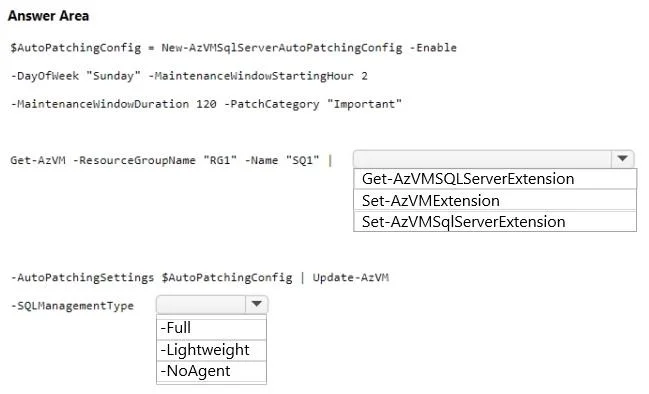
Answer Area
- Get-AzVM -ResourceGroupName "RG1" -Name "SQ1" |Set-AzVMSqlServerExtensionGet-AzVMSQLExtensionSet-AzVMExtensionSet-AzVMSqlServerExtension
- -SQLManagementType-Full-Full-Lightweight-NoAgent
Explanation
This question tests your ability to construct a PowerShell command to enable and configure Automated Patching for SQL Server on Azure Virtual Machines, ensuring both SQL Server and Windows security updates are included.
Approach. The correct PowerShell command uses 'New-AzVMSqlServerAutoPatchingConfig' to create the patching configuration object, specifying '-Enable' to turn on automated patching, '-DayOfWeek', '-MaintenanceWindowStartingHour', '-MaintenanceWindowDuration', and '-PatchCategory' set to 'Important' to include both Windows and SQL Server security updates. Then 'Set-AzVMSqlServerExtension' is used with '-AutoPatchingSettings' parameter passing the config object, along with '-ResourceGroupName RG1' and '-VMName SQ1' to apply the settings to the correct VM. The '-PatchCategory Important' parameter is critical as it ensures that both Windows OS updates and SQL Server updates are applied, meeting the requirement to include both SQL Server and Windows security updates.
Concept tested. The question tests knowledge of Azure PowerShell cmdlets for configuring SQL Server IaaS features, specifically 'New-AzVMSqlServerAutoPatchingConfig' for defining the automated patching configuration and 'Set-AzVMSqlServerExtension' for applying that configuration to the SQL Server VM. Understanding the correct parameters, especially '-PatchCategory' set to 'Important' to cover both Windows and SQL Server updates, is essential.
Topics
Community Discussion
No community discussion yet for this question.