
DP-300 · Question #295
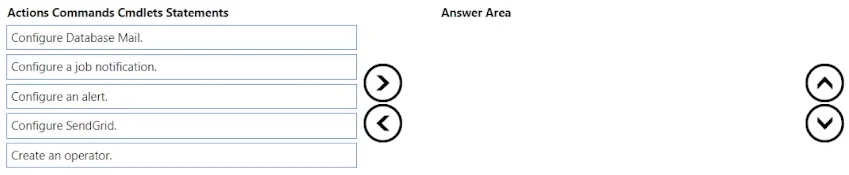
Drag and Drop Question You create an Azure SQL managed instance and a job that performs backups. You need to configure the job to notify a distribution group by email when the job fails. The…
The correct answer is Configure Database Mail.; Create an operator.; Configure a job notification. To enable email notifications for SQL Agent job failures on an Azure SQL Managed Instance, you must first Configure Database Mail (to set up the SMTP email infrastructure), then Create an Operator (a named recipient that references the Database Mail profile/email address), and…
Question
Exhibit
Answer Area
Drag items
Correct arrangement
- Configure Database Mail.
- Create an operator.
- Configure a job notification.
Explanation
To enable email notifications for SQL Agent job failures on an Azure SQL Managed Instance, you must first Configure Database Mail (to set up the SMTP email infrastructure), then Create an Operator (a named recipient that references the Database Mail profile/email address), and finally Configure a job notification (to link the job's failure event to that operator). This three-step sequence is the native SQL Server Agent approach built into Managed Instance and requires no external services, minimizing administrative effort.
Topics
Community Discussion
No community discussion yet for this question.