
DP-300 · Question #238
Drag and Drop Question You have an Azure subscription that contains an Azure SQL managed instance, a database named db1, and an Azure web app named App1. App1 uses db1. You need to enable Resource…
The correct answer is Create a resource pool that has the following configurations: MAX_CPU_PERCENT = 100 MIN_CPU_PERCENT = 50; Create a workload group.; Create a classifier function in the master database.; Create a classifier function in db1.; Create a plan. Resource Governor in Azure SQL Managed Instance requires three sequential steps: first, create a resource pool with MIN_CPU_PERCENT=50 (guarantees at least 50% CPU always) and MAX_CPU_PERCENT=100 (allows consuming all available CPU); second, create a workload group that…
Question
Exhibit
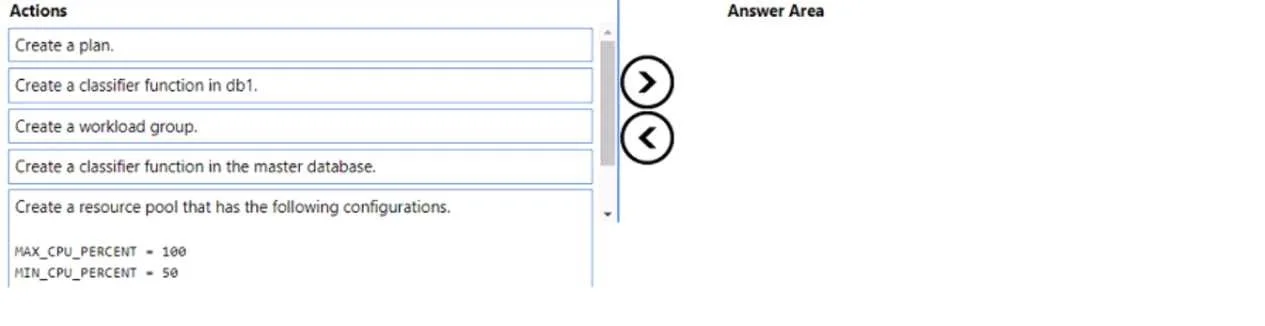
Answer Area
Drag items
Correct arrangement
- Create a resource pool that has the following configurations: MAX_CPU_PERCENT = 100 MIN_CPU_PERCENT = 50
- Create a workload group.
- Create a classifier function in the master database.
- Create a classifier function in db1.
- Create a plan.
Explanation
Resource Governor in Azure SQL Managed Instance requires three sequential steps: first, create a resource pool with MIN_CPU_PERCENT=50 (guarantees at least 50% CPU always) and MAX_CPU_PERCENT=100 (allows consuming all available CPU); second, create a workload group that references the resource pool to classify and manage workload requests; third, create a classifier function in the MASTER database (not a user database) to route incoming connections to the appropriate workload group, and then register it with Resource Governor using ALTER RESOURCE GOVERNOR WITH (CLASSIFIER_FUNCTION). The classifier function must reside in master because Resource Governor is an instance-level feature that operates before database context is fully established.
Topics
Community Discussion
No community discussion yet for this question.