
DP-300 · Question #203
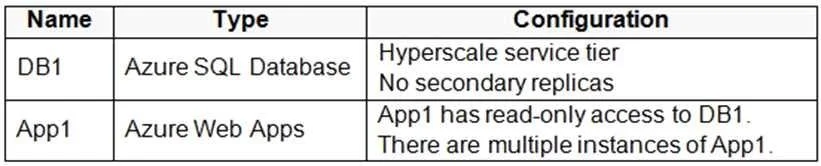
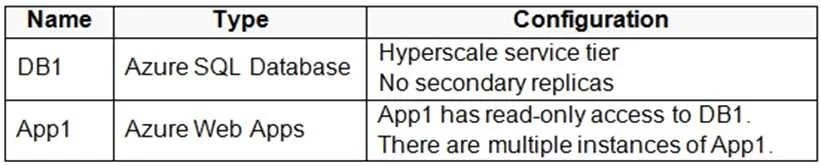
Hotspot Question You have an Azure subscription that contains the resources shown in the following table. You need to create a read-only replica of DB1 and configure the App1 instances to use the…
The correct answer is To add read-only replica of DB1, the correct action is 'Create a replica on the same logical server'. = Yes; To configure App1 instances to access the read-only replica, the correct action is 'Add an ApplicationIntent entry to the connection string'. = Yes. In Azure SQL Database, read-only replicas (also called readable secondary replicas) are created on the same logical server as the primary database, leveraging built-in High Availability architecture or Business Critical/Premium tiers that include free readable replicas. To…
Question
Exhibits
Answer Area
- To add read-only replica of DB1, the correct action is 'Create a replica on the same logical server'.Yes
- To configure App1 instances to access the read-only replica, the correct action is 'Add an ApplicationIntent entry to the connection string'.Yes
Explanation
In Azure SQL Database, read-only replicas (also called readable secondary replicas) are created on the same logical server as the primary database, leveraging built-in High Availability architecture or Business Critical/Premium tiers that include free readable replicas. To direct application traffic to the read-only replica instead of the primary, you append 'ApplicationIntent=ReadOnly' to the connection string, which instructs the Azure SQL Database service to route the connection to the read-only replica automatically without changing the server or database endpoint.
Topics
Community Discussion
No community discussion yet for this question.