
DP-300 · Question #197
Hotspot Question You have an Azure subscription that contains an Azure SQL database. The database fails to respond to queries in a timely manner. You need to identify whether the issue relates to…
The correct answer is SELECT column: wait_type; FROM sys. table: dm_exec_requests. This hotspot question tests knowledge of querying Azure SQL Database wait statistics using the sys.dm_exec_requests and sys.dm_os_wait_stats dynamic management views (DMVs) to diagnose resource_semaphore waits, which indicate memory grant pressure.
Question
Exhibit
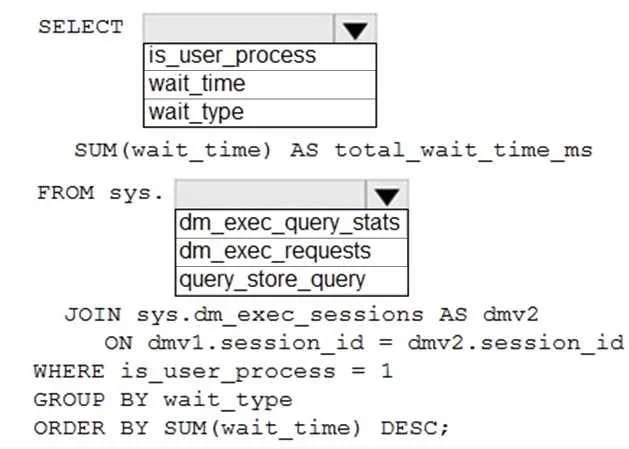
Answer Area
- SELECT columnwait_typeis_user_processwait_timewait_type
- FROM sys. tabledm_exec_requestsdm_exec_query_statsdm_exec_requestsquery_store_query
Explanation
This hotspot question tests knowledge of querying Azure SQL Database wait statistics using the sys.dm_exec_requests and sys.dm_os_wait_stats dynamic management views (DMVs) to diagnose resource_semaphore waits, which indicate memory grant pressure.
Approach. To identify resource_semaphore waits in Azure SQL Database, you should query sys.dm_exec_requests to see currently waiting requests and filter on wait_type = 'RESOURCE_SEMAPHORE', or query sys.dm_os_wait_stats to get cumulative wait statistics and filter where wait_type = 'RESOURCE_SEMAPHORE'. The correct T-SQL pattern is: SELECT * FROM sys.dm_exec_requests WHERE wait_type = 'RESOURCE_SEMAPHORE' (for live sessions) OR SELECT wait_type, waiting_tasks_count, wait_time_ms FROM sys.dm_os_wait_stats WHERE wait_type = 'RESOURCE_SEMAPHORE' (for historical aggregates). RESOURCE_SEMAPHORE waits occur when queries are waiting for memory grants before they can execute, indicating the workload is memory-pressure bound. For the hotspot dropdowns, the correct selections would be 'sys.dm_exec_requests' for the DMV name and 'wait_type' for the column to filter on, with 'RESOURCE_SEMAPHORE' as the filter value.
Concept tested. Diagnosing SQL Server/Azure SQL Database performance issues using Dynamic Management Views (DMVs), specifically identifying RESOURCE_SEMAPHORE waits which indicate memory grant contention. Understanding that sys.dm_exec_requests shows active/waiting requests while sys.dm_os_wait_stats shows cumulative wait statistics, and knowing the correct column names (wait_type, waiting_tasks_count, wait_time_ms) to query these DMVs effectively.
Reference. https://docs.microsoft.com/en-us/sql/relational-databases/system-dynamic-management-views/sys-dm-exec-requests-transact-sql and https://docs.microsoft.com/en-us/sql/relational-databases/system-dynamic-management-views/sys-dm-os-wait-stats-transact-sql
Topics
Community Discussion
No community discussion yet for this question.