
DP-300 · Question #195
Hotspot Question You have an Azure SQL database named db1 that contains an Azure Active Directory (Azure AD) user named user1. You need to test impersonation of user1 in db1 by running a SELECT…
The correct answer is EXECUTE AS: USER; Return to original execution context: REVERT. T-SQL Impersonation: EXECUTE AS / REVERT --- Dropdown 1: EXECUTE AS USER Why USER is correct: EXECUTE AS USER = 'user1' switches the execution context to a database-level principal (a user defined within the database). Since user1 is an Azure AD user inside db1, it is a…
Question
Exhibit
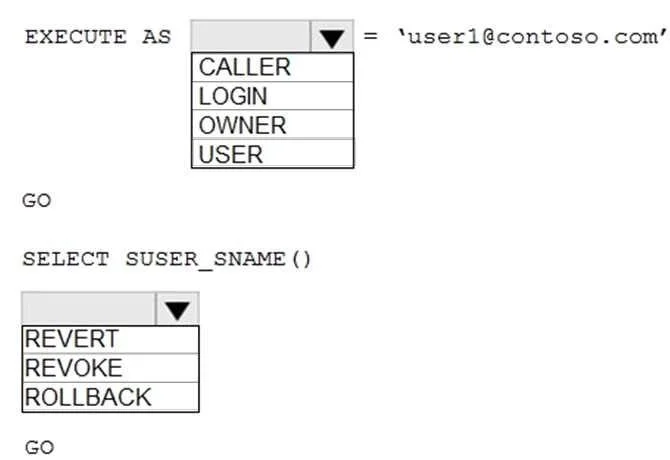
Answer Area
- EXECUTE ASUSERCALLERLOGINOWNERUSER
- Return to original execution contextREVERTREVERTREVOKEROLLBACK
Explanation
T-SQL Impersonation: EXECUTE AS / REVERT
Dropdown 1: EXECUTE AS USER
Why USER is correct:
EXECUTE AS USER = 'user1' switches the execution context to a database-level principal (a user defined within the database). Since user1 is an Azure AD user inside db1, it is a database-scoped identity - making USER the correct scope.
Why the alternatives are wrong:
| Option | Why it's wrong |
|---|---|
CALLER | Not a valid scope for EXECUTE AS in a standalone statement. AS CALLER is used inside stored procedure/function definitions to inherit the caller's context, not to impersonate a specific principal. |
LOGIN | Impersonates a server-level principal (SQL Server login), not a database user. Azure AD users in a specific database are not server-level logins in the same way, and this would be the wrong scope. |
OWNER | Switches context to the owner of the current module (procedure, function, etc.), not to a named user. It doesn't accept a username argument. |
Underlying concept: EXECUTE AS supports four contexts - CALLER, SELF, OWNER, and a named LOGIN or USER. The scope keyword determines whether you're targeting a server principal or a database principal.
Dropdown 2: REVERT
Why REVERT is correct:
REVERT is the dedicated T-SQL statement for exiting an impersonation context and returning to the original security context that existed before EXECUTE AS was called. It's the proper, paired counterpart to EXECUTE AS.
Why the alternatives are wrong:
| Option | Why it's wrong |
|---|---|
REVOKE | A DCL (Data Control Language) statement used to remove previously granted permissions from a principal. It has nothing to do with switching execution contexts. |
ROLLBACK | A TCL (Transaction Control Language) statement used to undo a database transaction. While a ROLLBACK can implicitly revert an EXECUTE AS if it's inside a transaction, it is not the correct or direct mechanism for context switching. |
Underlying concept: EXECUTE AS / REVERT work as a push/pop stack. Each EXECUTE AS pushes a new context onto the stack; REVERT pops back to the previous one. For nested impersonation, multiple REVERT calls step back through each level.
Complete Statement
EXECUTE AS USER = 'user1';

-- Run your SELECT statement here
SELECT ...

REVERT;  -- Returns to original execution context
Topics
Community Discussion
No community discussion yet for this question.