
DP-203 · Question #409
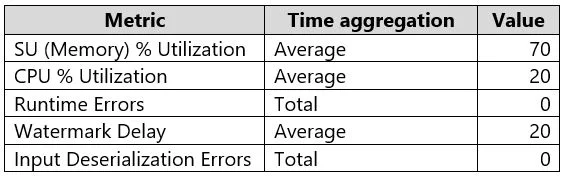
You have an Azure Stream Analytics job named Job1. The metrics of Job1 from the last hour are shown in the following table. The late arrival tolerance for Job1 is set to five seconds. You need to…
The correct answer is A. Increase the number of SUs. B. Parallelize the query. Azure Stream Analytics job optimization requires addressing resource constraints and query efficiency. Increasing SUs allocates more compute, and parallelizing the query distributes workload across partitions.
Question
You have an Azure Stream Analytics job named Job1. The metrics of Job1 from the last hour are shown in the following table. The late arrival tolerance for Job1 is set to five seconds. You need to optimize Job1. Which two actions achieve the goal? Each correct answer presents a complete solution. NOTE: Each correct answer is worth one point.
Exhibit
Options
- AIncrease the number of SUs.
- BParallelize the query.
- CResolve errors in output processing.
- DResolve errors in input processing.
How the community answered
(52 responses)- A77% (40)
- C17% (9)
- D6% (3)
Why each option
Azure Stream Analytics job optimization requires addressing resource constraints and query efficiency. Increasing SUs allocates more compute, and parallelizing the query distributes workload across partitions.
Streaming Units (SUs) represent the compute, memory, and throughput allocated to a Stream Analytics job. If the job is resource-constrained (high SU utilization shown in metrics), increasing SUs provides more processing capacity to handle the workload.
Parallelizing the query by partitioning both inputs and the query itself allows Stream Analytics to process multiple partitions concurrently, reducing bottlenecks and improving throughput without requiring additional SUs alone.
Output processing errors indicate a misconfiguration or connectivity issue with the output sink, not a performance bottleneck that would explain the optimization need suggested by the metrics.
Input processing errors indicate issues reading from the source, but the question context points to performance optimization rather than error resolution as the primary concern.
Concept tested: Azure Stream Analytics job performance optimization
Source: https://learn.microsoft.com/en-us/azure/stream-analytics/stream-analytics-streaming-unit-consumption
Topics
Community Discussion
No community discussion yet for this question.