
DP-203 · Question #370
Drag and Drop Question You have an Azure subscription that contains an Azure Cosmos DB for NoSQL account named account1. The account1 account contains a container named Container1 that has the…
The correct answer is Create a new container named Container2 and copy the contents of Container1 to Container2.; Delete Container1.; Create another container named Container1 and copy the contents of Container2 to Container1.; Delete Container2. To remove analytical store support from a container in Azure Cosmos DB, you cannot simply disable the analytical store on an existing container - it must be deleted and recreated without the analytical store enabled. The correct sequence is: (1) Create Container2 and copy…
Question
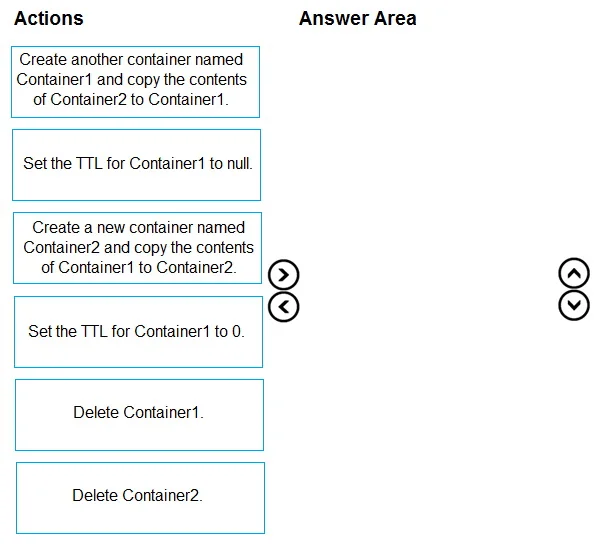
Drag and Drop Question You have an Azure subscription that contains an Azure Cosmos DB for NoSQL account named account1. The account1 account contains a container named Container1 that has the following configurations:
- Analytical store: On
- TTL: 3600
You need to remove analytical store support from Container1. The solution must meet the following requirements:
- Minimize the impact on the apps that reference Container1.
- Minimize storage usage.
Which four actions should you perform in sequence? To answer, move the appropriate actions from the list of actions to the answer area and arrange them in the correct order. Answer:
Exhibit
Answer Area
Drag items
Correct arrangement
- Create a new container named Container2 and copy the contents of Container1 to Container2.
- Delete Container1.
- Create another container named Container1 and copy the contents of Container2 to Container1.
- Delete Container2.
Explanation
To remove analytical store support from a container in Azure Cosmos DB, you cannot simply disable the analytical store on an existing container - it must be deleted and recreated without the analytical store enabled. The correct sequence is: (1) Create Container2 and copy Container1's data to it (preserving data), (2) Delete Container1 (removing the analytical-store-enabled container), (3) Recreate Container1 without analytical store enabled and copy Container2's data back into it (restoring the original name so apps are unaffected), and (4) Delete Container2 (minimizing storage usage). This approach minimizes app impact by restoring the original container name and minimizes storage by cleaning up the temporary container.
Topics
Community Discussion
No community discussion yet for this question.