
DP-203 · Question #332
Drag and Drop Question You have an Azure Synapse Analytics workspace named Workspace1. You perform the following changes: - Implement source control for Workspace1. - Create a branch named Feature…
The correct answer is Feature; Collaboration. In Azure Synapse Analytics source control workflow, you must first create a Pull Request (PR) from the Feature branch into the Collaboration branch to merge your changes. Once the changes are merged into the Collaboration branch, you then publish from the Collaboration branch…
Question
Drag and Drop Question You have an Azure Synapse Analytics workspace named Workspace1. You perform the following changes:
- Implement source control for Workspace1.
- Create a branch named Feature based on the collaboration branch.
- Switch to the Feature branch.
- Modify Workspace1.
You need to publish the changes to Azure Synapse. From which branch should you perform each change? To answer, select the appropriate options in the answer area. NOTE: Each correct selection is worth one point Answer:
Exhibit
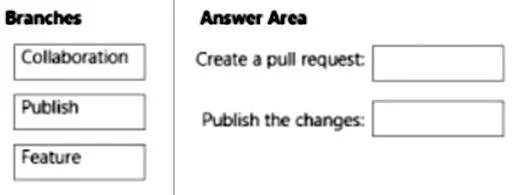
Answer Area
Drag items
Correct arrangement
- Feature
- Collaboration
Explanation
In Azure Synapse Analytics source control workflow, you must first create a Pull Request (PR) from the Feature branch into the Collaboration branch to merge your changes. Once the changes are merged into the Collaboration branch, you then publish from the Collaboration branch to push the changes to the live Azure Synapse service. You cannot publish directly from a Feature branch - publishing is only available from the collaboration branch.
Topics
Community Discussion
No community discussion yet for this question.