
DP-203 · Question #294
Drag and Drop Question You have an Azure subscription that contains an Azure Data Lake Storage Gen2 account named storage1. Storage1 contains a container named container1. Container1 contains a…
The correct answer is Execute; Execute; Write. In Azure Data Lake Storage Gen2, ACL permissions follow a POSIX-like model where to access a file deep in a directory hierarchy, a user needs Execute permission on every parent directory in the path (storage1/container1 and directory1) to traverse into them, and Write…
Question
Exhibit
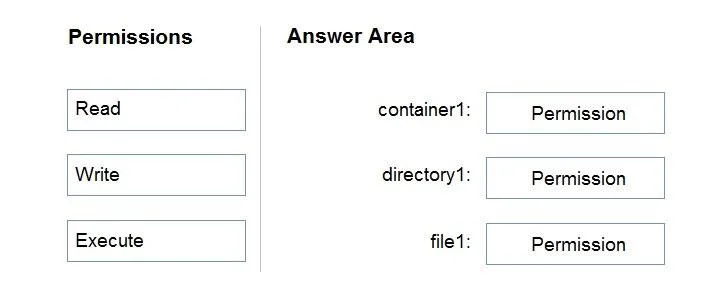
Answer Area
Drag items
Correct arrangement
- Execute
- Execute
- Write
Explanation
In Azure Data Lake Storage Gen2, ACL permissions follow a POSIX-like model where to access a file deep in a directory hierarchy, a user needs Execute permission on every parent directory in the path (storage1/container1 and directory1) to traverse into them, and Write permission on the target file (file1) itself to append data. The Storage Blob Data Reader role already grants Read access at the account level via RBAC, but granular ACL permissions are still needed for the directory traversal and file modification. Granting Execute on container1/directory1 and Write on file1 satisfies the append requirement with the least privilege - no broader Write or Read ACL grants are needed on the directories themselves.
Topics
Community Discussion
No community discussion yet for this question.