
DP-203 · Question #183
Drag and Drop Question You are designing an Azure Data Lake Storage Gen2 structure for telemetry data from 25 million devices distributed across seven key geographical regions. Each minute, the…
The correct answer is @trigger().outputs.windowStartTime; /{YYYY}/{MM}/{DD}/{HH}_{deviceType}.json; Merge files. Explanation: Azure Data Lake Storage Gen2 Folder Structure This question tests your knowledge of Azure Data Factory (ADF) pipeline design, ADLS Gen2 partitioning strategy, and copy activity behavior for streaming telemetry workloads. --- Position 1…
Question
Exhibit
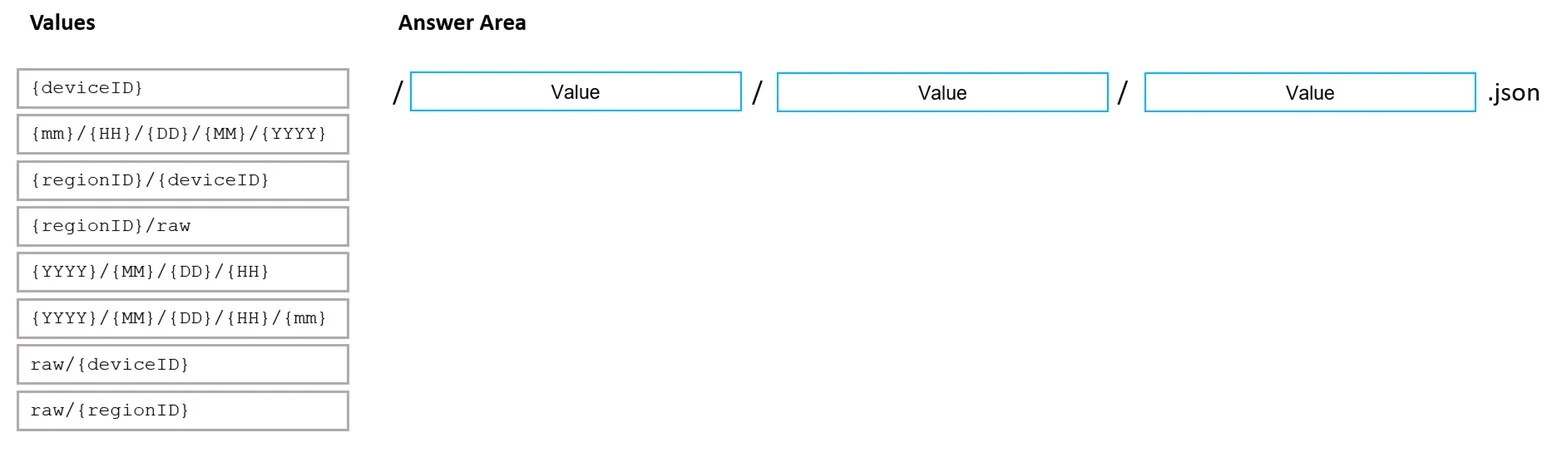
Answer Area
Drag items
Correct arrangement
- @trigger().outputs.windowStartTime
- /{YYYY}/{MM}/{DD}/{HH}_{deviceType}.json
- Merge files
Explanation
Explanation: Azure Data Lake Storage Gen2 Folder Structure
This question tests your knowledge of Azure Data Factory (ADF) pipeline design, ADLS Gen2 partitioning strategy, and copy activity behavior for streaming telemetry workloads.
Position 1: @trigger().outputs.windowStartTime
What it fills: The dynamic expression used to timestamp data partitions in the pipeline trigger configuration.
Why this is correct:
The requirement says data must be processed at least every 15 minutes. This mandates a Tumbling Window Trigger in ADF - a trigger type that fires on fixed, non-overlapping 15-minute intervals. The expression @trigger().outputs.windowStartTime returns the start time of that specific window, which is exactly what you need to correctly label which time window the output data belongs to.
Why the others are wrong:
| Expression | Problem |
|---|---|
@pipeline().TriggerTime | Returns when the pipeline ran, not the window boundary - causes data misalignment across retries |
@trigger().startTime | Returns when the trigger instance fired (wall clock), not the logical window start |
@trigger().TriggerType | Returns a string like "TumblingWindowTrigger" - not a time value at all |
Position 2: /{YYYY}/{MM}/{DD}/{HH}_{deviceType}.json
What it fills: The sub-folder/file path pattern beneath the region-level root folder.
Why this is correct:
The full structure would look like: /{region}/{YYYY}/{MM}/{DD}/{HH}_{deviceType}.json
{region}at root satisfies the access control requirement - each region's data engineers get RBAC/ACL permissions scoped to their region folder only.{HH}(hour partition) is necessary because Synapse serverless SQL pools use partition pruning - queries for a 15-minute window can target a specific hour folder, avoiding full scans.{deviceType}provides an additional partition dimension for Synapse queries without the explosion of files you'd get from partitioning by{deviceID}(25 million devices = 25 million tiny files per minute).
Why the others are wrong:
| Path | Problem |
|---|---|
/{YYYY}/{MM}/{DD}/{HH}.json | Missing {deviceType} - no way to filter by device type efficiently |
/{YYYY}/{MM}/{DD}/{deviceType}.json | Missing {HH} - cannot scope queries to 15-minute processing windows |
// {deviceID}/out/{YYYY}/{MM}/{DD}/{HH}.json | {deviceID} creates 25M+ folders - catastrophic small-files problem, ADLS namespace overhead |
Position 3: Merge files
What it fills: The copy behavior setting on the ADF Copy Activity sink.
Why this is correct:
Devices send one JSON payload per minute. With 25 million devices, even within a single region/hour/deviceType partition, you'd generate millions of tiny files. The Merge files option consolidates all files written to the target folder into a single output file per partition. This is critical because:
- Synapse Analytics serverless SQL pools perform far better reading one large file than thousands of tiny ones (the classic small files problem).
- It reduces ADLS Gen2 transaction costs and namespace metadata overhead.
Why the others are wrong:
| Option | Problem |
|---|---|
Flatten hierarchy | Collapses folder structure into a flat directory - destroys the partition layout you just built |
Add dynamic content | A UI action for inserting expressions, not a copy behavior option |
Key Misconception to Avoid
A common mistake is confusing @trigger().startTime with @trigger().outputs.windowStartTime. The startTime is a wall-clock timestamp that shifts on retries and doesn't align to window boundaries. Always use windowStartTime when your trigger is a Tumbling Window and you need idempotent, deterministic output paths.
Topics
Community Discussion
No community discussion yet for this question.