
DP-203 · Question #15
You are creating an Azure Data Factory data flow that will ingest data from a CSV file, cast columns to specified types of data, and insert the data into a table in an Azure Synapse Analytic…
The correct answer is A. To the data flow, add a sink transformation to write the rows to a file in blob storage. B. To the data flow, add a Conditional Split transformation to separate the rows that will cause. 1. This conditional split transformation defines the maximum length of "title" to be five. Any row that is less than or equal to five will go into the GoodRows stream. Any row that is larger than five will go into the BadRows stream. 2. This conditional split transformation…
Question
You are creating an Azure Data Factory data flow that will ingest data from a CSV file, cast columns to specified types of data, and insert the data into a table in an Azure Synapse Analytic dedicated SQL pool. The CSV file contains three columns named username, comment, and date. The data flow already contains the following:
- A source transformation.
- A Derived Column transformation to set the appropriate types of data.
- A sink transformation to land the data in the pool.
You need to ensure that the data flow meets the following requirements:
- All valid rows must be written to the destination table.
- Truncation errors in the comment column must be avoided proactively.
- Any rows containing comment values that will cause truncation errors
upon insert must be written to a file in blob storage. Which two actions should you perform? Each correct answer presents part of the solution. NOTE: Each correct selection is worth one point.
Exhibit
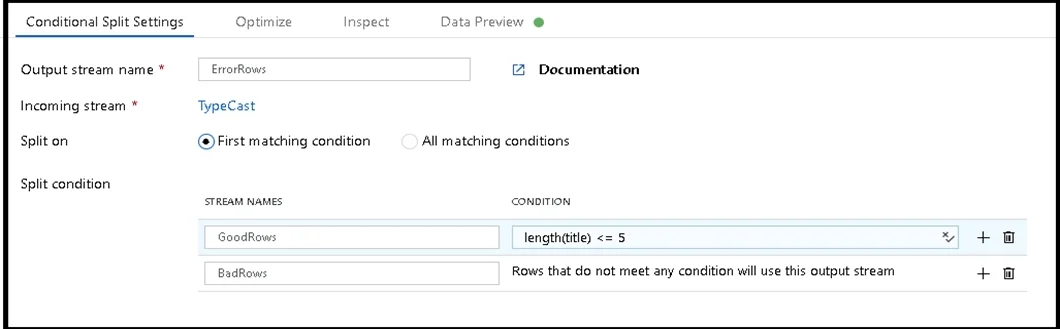
Options
- ATo the data flow, add a sink transformation to write the rows to a file in blob storage.
- BTo the data flow, add a Conditional Split transformation to separate the rows that will cause
- CTo the data flow, add a filter transformation to filter out rows that will cause truncation errors.
- DAdd a select transformation to select only the rows that will cause truncation errors.
How the community answered
(32 responses)- A72% (23)
- C9% (3)
- D19% (6)
Explanation
- This conditional split transformation defines the maximum length of "title" to be five. Any row that is less than or equal to five will go into the GoodRows stream. Any row that is larger than five will go into the BadRows stream. 2. This conditional split transformation defines the maximum length of "title" to be five. Any row that is less than or equal to five will go into the GoodRows stream. Any row that is larger than five will go into the BadRows stream. 3. Now we need to log the rows that failed. Add a sink transformation to the BadRows stream for Here, we'll "auto-map" all of the fields so that we have logging of the complete transaction record. This is a text-delimited CSV file output to a single file in Blob Storage. We'll call the log file 4. The completed data flow is shown below. We are now able to split off error rows to avoid the SQL truncation errors and put those entries into a log file. Meanwhile, successful rows can continue to write to our target database. https://docs.microsoft.com/en-us/azure/data-factory/how-to-data-flow-error-rows
Topics
Community Discussion
No community discussion yet for this question.