
DP-100 · Question #548
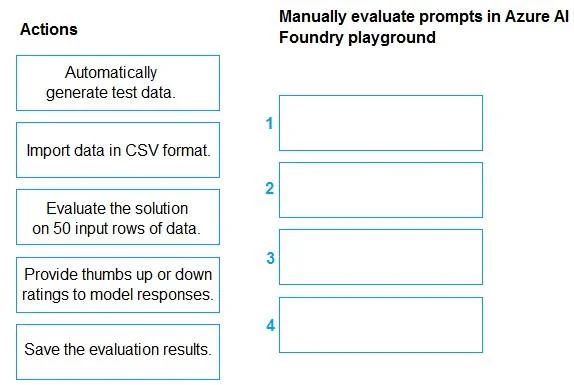
Drag and Drop Question You manage an Azure AI Foundry project. You deploy a large language model from the model catalog. You need to manually evaluate the model, collect the statistics, and be able…
The correct answer is Import data in CSV format.; Evaluate the solution on 50 input rows of data.; Automatically generate test data.; Save the evaluation results. The correct sequence for manually evaluating an Azure AI Foundry large language model involves importing custom data, running the model to generate responses, providing human ratings, and then saving the evaluation results for later review.
Question
Exhibit
Answer Area
Drag items
Correct arrangement
- Import data in CSV format.
- Evaluate the solution on 50 input rows of data.
- Automatically generate test data.
- Save the evaluation results.
Explanation
The correct sequence for manually evaluating an Azure AI Foundry large language model involves importing custom data, running the model to generate responses, providing human ratings, and then saving the evaluation results for later review.
Approach. The goal is to manually evaluate a large language model's prompts, collect statistics, and review results later. This implies a process where human judgment is involved in assessing model output. The correct sequence of actions for this scenario is:
- Import data in CSV format: To perform a manual evaluation on specific prompts, the first logical step is to bring in the test data (the prompts) that you want to evaluate. Importing data in CSV format is a standard way to provide custom input to an evaluation process.
- Evaluate the solution on 50 input rows of data: Once the input data (prompts) is available, the model needs to process these prompts and generate responses. This step executes the model against the imported data, producing outputs that can then be manually reviewed.
- Provide thumbs up or down ratings to model responses: This is the core 'manual evaluation' step. In an AI playground or evaluation environment, human annotators or testers provide subjective feedback on the quality of the model's responses to the prompts. Thumbs up/down ratings are a common mechanism for this. This directly addresses the 'manually evaluate' requirement.
- Save the evaluation results: After the manual ratings have been provided, it is crucial to save these results. This action ensures that the collected statistics and human feedback are preserved and can be reviewed later, fulfilling the final requirement of the scenario.
Therefore, the correct sequence to drag and drop into the answer area is:
- Import data in CSV format.
- Evaluate the solution on 50 input rows of data.
- Provide thumbs up or down ratings to model responses.
- Save the evaluation results.
Common mistakes.
- common_mistake. A common mistake would be to include 'Automatically generate test data' in the sequence. The question specifically asks for a manual evaluation. While automatic test data generation is useful for automated evaluations, it bypasses the manual process of humans providing subjective ratings, which is essential for a 'manual evaluation of prompts' in a playground setting. The provided second image exemplifies this mistake by including 'Automatically generate test data' at step 3 instead of 'Provide thumbs up or down ratings to model responses'. Other incorrect sequences might include putting 'Save the evaluation results' before all feedback is collected, or attempting to provide ratings before the model has processed the input data.
Concept tested. The question tests the understanding of the lifecycle and process for evaluating large language models (LLMs) in Azure AI Foundry, specifically distinguishing between manual and automated evaluation methods, and the logical steps involved in performing a manual, human-in-the-loop evaluation of model responses to prompts. It also tests the ability to sequence these steps correctly within an evaluation workflow.
Topics
Community Discussion
No community discussion yet for this question.